
Comprehensive Guide to iCloud, Bluetooth, and HDMI Connections for Your HD TV

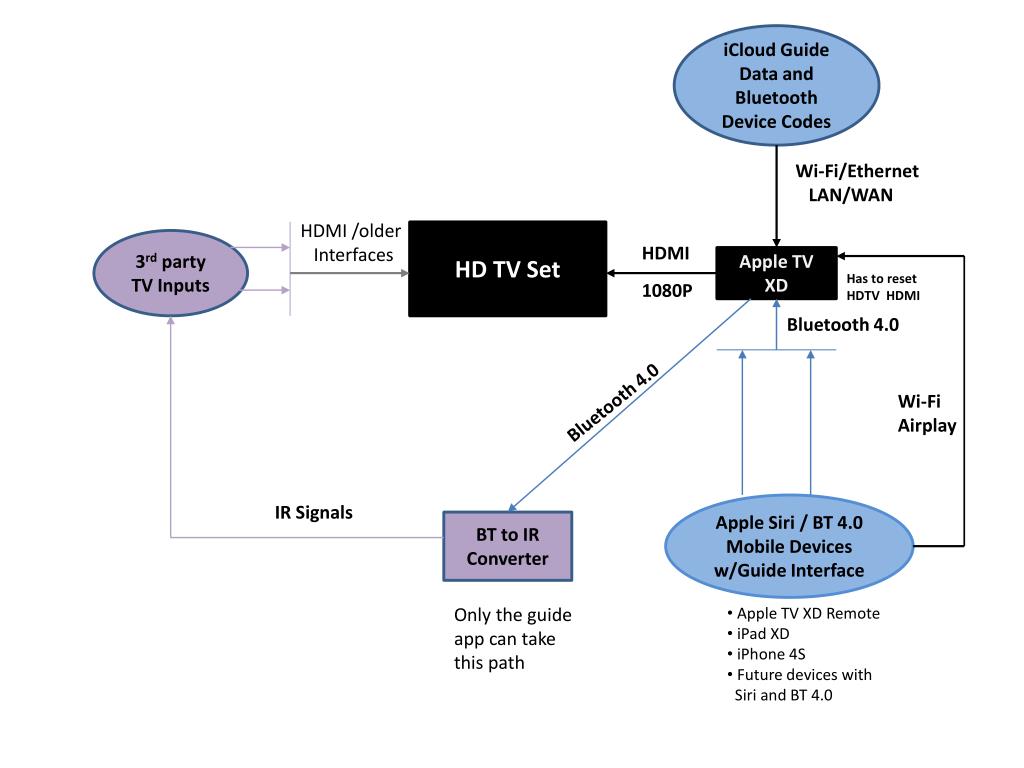
This guide provides detailed instructions on using iCloud, Bluetooth, and HDMI with your older TV and Apple devices. Learn how to set up Wi-Fi and Ethernet connections, reset your HDTV, and utilize Bluetooth 4.0 and AirPlay features. Discover how to integrate Apple TV and third-party inputs, while managing IR signals. This resource is essential for using the Apple TV XD remote with devices like the iPad XD and iPhone 4S, and for future devices that support Siri and Bluetooth 4.0.
Télécharger la présentation 
Politique de téléchargement : le contenu du site vous est fourni TEL QUEL pour votre information et votre usage personnel ; il ne peut être vendu, concédé sous licence ni partagé sur d’autres sites sans l’accord de son auteur.Le contenu vous est fourni TEL QUEL, pour votre information et votre usage personnel uniquement. Téléchargez la présentation en cliquant sur ce lien. Lors du téléchargement, si vous ne parvenez pas à télécharger une présentation, l’éditeur a peut-être supprimé le fichier de son serveur.Pendant le téléchargement, si vous ne parvenez pas à obtenir une présentation, le fichier a peut-être été supprimé par l’éditeur.
F I N