
Uploaded by
kasimir-harvey
1 SLIDES
126 VUES
10LIKES
Configuring Network Devices: IP Assignment and Server Setup Guide
DESCRIPTION
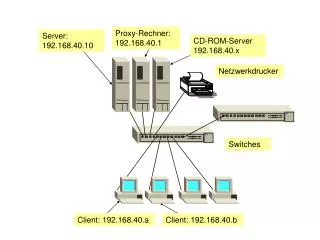
This guide details the configuration of network devices within a specified IP range. Learn how to assign IP addresses (e.g., 192.168.40.x) for servers, clients, and network printers. Discover how to set up a proxy server (192.168.40.1), a dedicated server (192.168.40.10), and configure network printers. Gain insights into managing switches and client devices (192.168.40.a, 192.168.40.b) effectively for optimal network performance and security.
Download
1 / 1
Télécharger la présentation 
Configuring Network Devices: IP Assignment and Server Setup Guide
An Image/Link below is provided (as is) to download presentation
Download Policy: Content on the Website is provided to you AS IS for your information and personal use and may not be sold / licensed / shared on other websites without getting consent from its author.
Content is provided to you AS IS for your information and personal use only.
Download presentation by click this link.
While downloading, if for some reason you are not able to download a presentation, the publisher may have deleted the file from their server.
During download, if you can't get a presentation, the file might be deleted by the publisher.
E N D
Presentation Transcript
Com 3 Com 3 Proxy-Rechner:192.168.40.1 Server:192.168.40.10 CD-ROM-Server192.168.40.x Netzwerkdrucker Switches Client: 192.168.40.a Client: 192.168.40.b















More Related