HTTP
HTTP (Hypertext Transfer Protocol) is a protocol for transferring various data formats between a server and a client, enabling seamless communication over the web. It facilitates the exchange of plaintext, hypertext, images, videos, and audio. HTTP uses URLs to reference resources and supports both absolute and relative paths. The protocol defines a request-response model, where clients send requests and servers respond, handling numerous file types. Relevant HTTP version specifications guide the structure and processing of these requests and responses.

HTTP
E N D
Presentation Transcript
HTTP Hypertext Transfer Protocol
What It Is • Protocol for transfer of various data formats between server and client • Plaintext • Hypertext • Images • Video • Sound • Meta-information also transferred HTTP
Uniform Resources • URL • Uniform Resource Locator • Refers to an existing protocol • http:, wais:, ftp:, mailto:, gopher:, news: • Points to a document on a specific server • URN • Uniform Resource Name • Globally unique, persistent identifier • Independent of location HTTP
Uniform Resources • URI • Uniform Resource Identifier • Collection of URL’s and URN’s HTTP
URL • <scheme> : //<host> :<port> /<path> ;<parameters> ?<query> #<fragment> • scheme • The protocol you are using • host • Host name or ip number • port • TCP port number that protocol server is using • path • Path and filename reference of object on server HTTP
URL • <scheme> : //<host> :<port> /<path> ;<parameters> ?<query> #<fragment> • parameters • Any specific parameters that object needs • query • Query string for a CGI program • fragment • Reference to a subset of an object HTTP
URL and HTTP • All parts of URL, except parameters, used with http • Scheme and host can be omitted when referenced object is on same machine as referring document • Port can be omitted so long as referenced host is running on port listed in your /etc/services file • Usually port 80 HTTP
URL and HTTP • Full path used when referring to another server • Relative path on same server • Reference with relative path is a partialURL • Query passes parameters to CGI • Fragment jumps to labels within a page • http://www.x.y/z#foo HTTP
Web Documents • html • ASCII text • Preformatted • postscript • Images • GIF • JPEG • Video • MPEG • VRML • Java HTTP
Communication • Server tells client what type of information is coming before information arrives • File extensions • .html .htm • .txt • .ps • .au • .gif .tiff .jpeg • .mpeg • .vrml .wrl • .java HTTP
Communication • Text and inline images • Separate objects • Client browser may optionally send a list of formats it can accept • Document can be a program • Web server executes program and sends results to client • Generic term for this program is script, gateway, or gateway script HTTP
Scripts • Translates input from client • Calls other programs • Translates output from programs and returns it to client HTTP
Gateways • Translates from one protocol or service to another • HTTP / database query • Database query results / HTTP HTTP
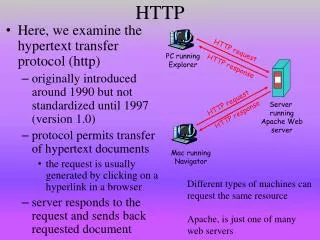
HTTP 1.0 • Berners Lee, Fielding, Nielsen - 1995 • Used in hypermedia systems distributed across networks • Defines request-response conversation • Requesting program (client) establishes connection with receiving program (server) • Client sends request to server • HTTP specifies syntax HTTP
HTTP 1.0 • Defines request-response conversation • Server replies with response • http specifies syntax • Does not handle network connectivity or how information is transmitted • TCP/IP does this HTTP
HTTP 1.0 • HTTP request • Method • URI • Protocol version • Optional other information • Method [Request URI] HTTP/1.0 <CRLF> HTTP
HTTP 1.0 • Method • Get • Returns object • Head • Returns information about object • Post • Sends information to be stored on server or as input to script HTTP
HTTP 1.0 • Method • Put • Sends new copy of existing object to server • Usually not allowed • Delete • Deletes object • Usually not allowed HTTP
HTTP 1.0 • Other information • User Agent • Kind of browser • If-Modified-Since • Returns object only if more recent than given date • Otherwise returns status code 304 HTTP
HTTP 1.0 • Other information • Accept • Mime types which browser can accept • Multipurpose Internet Mail Extension • text/plain • text/html • application/postscript • image/gif • image/jpeg • audio/basic • video/mpeg • x-world/x-vrml HTTP
HTTP 1.0 • Other information • Authorization • User password GET /X/Y/Z.HTML HTTP 1.0 User Agent: Prodigy-WB/1.3e Accept: text/plain Accept: text/html Accept: application/postscript Accept: image/gif • Accept: */* HTTP
HTTP 1.0 • HTTP response • Status line • HTTP-version Status-code Reason • Status-codes 1xx - Informational • Reserved for future use HTTP
HTTP 1.0 • HTTP response • Status line • Status-codes 2xx - Success • The action was successfully received, understood, and accepted • 200 OK • 201 POST command successful • 202 Request accepted • 203 GET or HEAD request fulfilled • 204 No content HTTP
HTTP 1.0 • HTTP response • Status line • Status-codes 3xx - Redirection • Further action must be taken in order to complete request • 300 Resource found at multiple locations • 301 Resource moved permanently • 302 Resource moved temporarily • 304 Resource has not modified (since date) HTTP
HTTP 1.0 • HTTP response • Status line • Status-codes 4xx - Client error • The request contains bad syntax or cannot be fulfilled • 400 Bad request from client • 401 Unauthorized request • 402 Payment required for request • 403 Resource access forbidden • 404 Resource not found • 405 Method not allowed for resource • 406 Resource type not acceptable HTTP
HTTP 1.0 • HTTP response • Status line • Status-codes 5xx - Server error • The server failed to fulfill an apparently valid request • 500 Internal server error • 501 Method not implemented • 502 Bad gateway or server overload • 503 Service unavailable / gateway timeout • 504 Secondary gateway / server timeout HTTP
HTTP 1.0 • HTTP response • Description of information • Server Type of server • Date Date and time • Content-Length Number of bytes • Content-Type Mime type • Content-Language English, for example • Content-Encoding Data compression • Last-Modified Date when last modified • Expires Date when file becomes invalid HTTP
HTTP 1.0 • Problems • HTTP is stateless • Each request requires separate TCP connection • Server doesn’t remember previous requests HTTP
Evolution of HTTP • HTTP/0.9 - 1990 • Request method + URI + crlf • GET /pets/index.html • Just file contents sent back • No header information • Gopher influence • Media types • Single character indicated one of ten types HTTP
Evolution of HTTP • HTTP/1.0 - 1995 • Meta-information between client and server • Media types • MIME type/subtype • Status codes • This information influenced the development of web search engines • Caching • Authorization HTTP
Evolution of HTTP • HTTP/1.0 - 1995 • Problems • Scalability • High number of clients visit server for short time • Flash crowd • Bandwidth HTTP
Evolution of HTTP • HTTP/1.1 • Byte ranges • Request of a document subset • Adobe's Portable Document Format • Streaming multimedia • Eliminates unnecessary client/server communication • An interrupted transfer which is restarted can be more efficient HTTP
Evolution of HTTP • HTTP/1.1 • Content negotiation with quality factors • Quality factors • Real numbers between 0 and 1 • Default is 1 • Accept-Language: fr, en-gb; q=0.8, en; q=0.7 HTTP
Evolution of HTTP • HTTP/1.1 • Chunked encoding • Transmission of streaming multimedia • One frame varies in size and composition from the next • Streaming video • Entire image transmitted in first chunk and differences to the previous image are transmitted in the next chunk HTTP
Evolution of HTTP • HTTP/1.1 • Protocol switching • Client can specify another protocol more suited to data being transferred • Message integrity checks • Digest authentication • In HTTP/1.0, user sent username and password over the network • In HTTP/1.1, the client and the server never send the actual username or password over the network HTTP
Evolution of HTTP • HTTP/1.1 • Persistent connections • In HTTP/1.0, if a single page includes inline images, multiple frames, animation, and other external references, to browse this page would require many reconnections • In HTTP/1.1 there are multiple request/response transactions per connection • Clients can pipeline requests to the server by sending multiple requests at start of session HTTP
Evolution of HTTP • HTTP/1.1 • Cache management with entity tags • When body of URI changes, so does its entity tag • Useful for maintaining caches, as updated URI information would have a different entity tag • Can tell if same resource is being cached from multiple URI's as it would have same entity tag • Strong entity tag • Changes when any portion of resource changes • One or more bytes change • Weak entity tag • Changes only when semantics of entity-body changes HTTP
Evolution of HTTP • HTTP/1.1 • Software multihoming • Number of available IP addresses is a concern • In HTTP/1.0, server could have multiple DNS entries and IP addresses, each corresponding to different document tree • In HTTP/1.1, server could have multiple DNS entries and only a single IP address HTTP
The Future • HTTP-Next Generation • Many channels • One TCP connection carries multiple channels for parallel communication • Different protocols on each channel • Traditional way • Multiple TCP connections between same client and server • Pages contain images, video, audio, and html HTTP
The Future • Extensibility • Adding new MIME headers has been the traditional way of extending http • Drawbacks • No indication whether receiving end understands these extensions • No indication whether extension is intended for all parties along message path or only for certain intermediaries • No indication of order in which extensions should be interpreted HTTP
The Future • Extensibility • PEP • Protocol Extension Protocol HTTP
The Future • Performance • Parsing MIME headers wastes resources • Sticky headers • Persistent state between multiple http requests • Not all headers have to be included in every http message • Distributed authoring • Event notification HTTP
The Future • Caching and replication • Popular sites are really popular • Flash crowds happen • Hot spots on the net are dynamic • Amount of dynamic data is increasing HTTP
The Future • QoS • Quality of service • Not everything must be treated with same QoS • Required QoS should be made at the user-interface HTTP
The Future • Real-time protocols and the web • Streaming protocols • Audio/video-on-demand HTTP