Unlock Creativity in the Classroom with SP.STUDIO: Engaging Cartoons and Animations
SP.STUDIO transforms learning by making it fun and engaging for both students and teachers. This tool allows you to create documents that come alive with animations, enabling students to tell their stories or produce exciting homework assignments. Discover how to use SP.STUDIO in your classroom by exploring creative examples like animated vocabulary stories or language games. Watch our tutorial on creating characters and integrating them into PowerPoint or Word documents. Start animating your lessons and inspire your students today!

Unlock Creativity in the Classroom with SP.STUDIO: Engaging Cartoons and Animations
E N D
Presentation Transcript
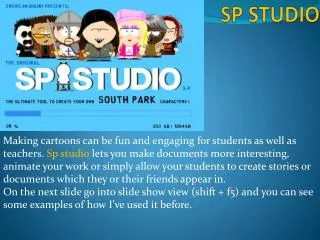
SP STUDIO Making cartoons can be fun and engaging for students as well as teachers. Sp studio lets you make documents more interesting, animate your work or simply allow your students to create stories or documents which they or their friends appear in. On the next slide go into slide show view (shift + f5) and you can see some examples of how I’ve used it before.
Sending self profiles to an epals school partner in Spain Making homework more interesting CLICK ON ANY OF THESE IN SLIDE SHOW VIEW TO SEE AN EXAMPLE OF AN EDUCATIONAL USE OF SP STUDIO. Setting a realistic scene for language games. Animating stories to make learning vocab more fun.
Next watch this video on how to make a character and put them into a PowerPoint or Word. Enter slide show view (shift + f5 and click on link) http://www.screencast.com/users/bvgstraining2/folders/Jing/media/74d31251-4ad9-4caa-b637-a804d1bde690 Now it’s over to you, if you’ve chosen this activity then think of a way you could use a cartoon and produce a document with it. Please make sure you upload your document to GMAIL in the folders section. So after saving it……. …Log on to GMAIL bvgstraining1 (or 2 3 4 5) password = bellevue Click on Documents…This will open up Google Docs . You then need to click on upload and… after you upload your file make sure you choose TRAINING as your destination folder.