Linear filtering
This guide explores linear filtering methods for noise reduction in images, emphasizing the convenience of averaging multiple images to improve quality. It details the moving average technique using a filter kernel, the properties of convolution, and various filter operations like Gaussian smoothing. Additionally, it addresses challenges regarding edge effects and provides MATLAB examples for practical application. Understanding these concepts will enhance your image processing skills and contribute to producing clearer, noise-free images.

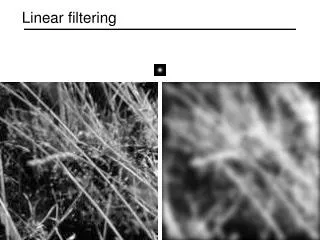
Linear filtering
E N D
Presentation Transcript
Motivation: Noise reduction • Given a camera and a still scene, how can you reduce noise? Take lots of images and average them! What’s the next best thing? Source: S. Seitz
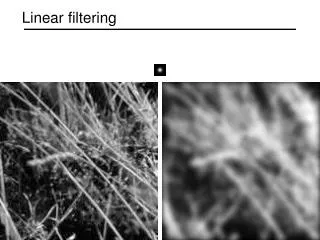
1 1 1 1 1 1 1 1 1 “box filter” Moving average • Let’s replace each pixel with a weighted average of its neighborhood • The weights are called the filter kernel • What are the weights for the average of a 3x3 neighborhood? Source: D. Lowe
f Defining convolution • Let f be the image and g be the kernel. The output of convolving f with g is denoted f * g. • Convention: kernel is “flipped” • MATLAB: conv2 vs. filter2 (also imfilter) Source: F. Durand
Key properties • Linearity: filter(f1 + f2 ) = filter(f1) + filter(f2) • Shift invariance: same behavior regardless of pixel location: filter(shift(f)) = shift(filter(f)) • Theoretical result: any linear shift-invariant operator can be represented as a convolution
Properties in more detail • Commutative: a * b = b * a • Conceptually no difference between filter and signal • Associative: a * (b * c) = (a * b) * c • Often apply several filters one after another: (((a * b1) * b2) * b3) • This is equivalent to applying one filter: a * (b1 * b2 * b3) • Distributes over addition: a * (b + c) = (a * b) + (a * c) • Scalars factor out: ka * b = a * kb = k (a * b) • Identity: unit impulse e = […, 0, 0, 1, 0, 0, …],a * e = a
Annoying details • What is the size of the output? • MATLAB: filter2(g, f, shape) • shape = ‘full’: output size is sum of sizes of f and g • shape = ‘same’: output size is same as f • shape = ‘valid’: output size is difference of sizes of f and g full same valid g g g g f f f g g g g g g g g
Annoying details • What about near the edge? • the filter window falls off the edge of the image • need to extrapolate • methods: • clip filter (black) • wrap around • copy edge • reflect across edge Source: S. Marschner
Annoying details • What about near the edge? • the filter window falls off the edge of the image • need to extrapolate • methods (MATLAB): • clip filter (black): imfilter(f, g, 0) • wrap around: imfilter(f, g, ‘circular’) • copy edge: imfilter(f, g, ‘replicate’) • reflect across edge: imfilter(f, g, ‘symmetric’) Source: S. Marschner
0 0 0 0 1 0 0 0 0 Practice with linear filters ? Original Source: D. Lowe
0 0 0 0 1 0 0 0 0 Practice with linear filters Original Filtered (no change) Source: D. Lowe
0 0 0 0 0 1 0 0 0 Practice with linear filters ? Original Source: D. Lowe
0 0 0 0 0 1 0 0 0 Practice with linear filters Original Shifted left By 1 pixel Source: D. Lowe
1 1 1 1 1 1 1 1 1 Practice with linear filters ? Original Source: D. Lowe
1 1 1 1 1 1 1 1 1 Practice with linear filters Original Blur (with a box filter) Source: D. Lowe
0 1 0 1 1 0 1 0 1 2 1 0 1 0 1 0 1 0 Practice with linear filters - ? (Note that filter sums to 1) Original Source: D. Lowe
0 1 0 1 1 0 1 0 1 2 1 0 1 0 1 0 1 0 Practice with linear filters - Original • Sharpening filter • Accentuates differences with local average Source: D. Lowe
Sharpening Source: D. Lowe
Smoothing with box filter revisited • Smoothing with an average actually doesn’t compare at all well with a defocused lens • Most obvious difference is that a single point of light viewed in a defocused lens looks like a fuzzy blob; but the averaging process would give a little square Source: D. Forsyth
Smoothing with box filter revisited • Smoothing with an average actually doesn’t compare at all well with a defocused lens • Most obvious difference is that a single point of light viewed in a defocused lens looks like a fuzzy blob; but the averaging process would give a little square • Better idea: to eliminate edge effects, weight contribution of neighborhood pixels according to their closeness to the center, like so: “fuzzy blob”
Gaussian Kernel • Constant factor at front makes volume sum to 1 (can be ignored, as we should re-normalize weights to sum to 1 in any case) 0.003 0.013 0.022 0.013 0.003 0.013 0.059 0.097 0.059 0.013 0.022 0.097 0.159 0.097 0.022 0.013 0.059 0.097 0.059 0.013 0.003 0.013 0.022 0.013 0.003 5 x 5, = 1 Source: C. Rasmussen
Choosing kernel width • Gaussian filters have infinite support, but discrete filters use finite kernels Source: K. Grauman
Choosing kernel width • Rule of thumb: set filter half-width to about 3 σ
Gaussian filters • Remove “high-frequency” components from the image (low-pass filter) • Convolution with self is another Gaussian • So can smooth with small-width kernel, repeat, and get same result as larger-width kernel would have • Convolving two times with Gaussian kernel of width σ is same as convolving once with kernel of width σ√2 • Separable kernel • Factors into product of two 1D Gaussians Source: K. Grauman
Separability of the Gaussian filter Source: D. Lowe
* = = * Separability example 2D convolution(center location only) The filter factorsinto a product of 1Dfilters: Perform convolutionalong rows: Followed by convolutionalong the remaining column: Source: K. Grauman
Separability • Why is separability useful in practice?
Review: Linear filtering • Properties of convolution • Properties of Gaussian kernels
Noise • Salt and pepper noise: contains random occurrences of black and white pixels • Impulse noise: contains random occurrences of white pixels • Gaussian noise: variations in intensity drawn from a Gaussian normal distribution Source: S. Seitz
Gaussian noise • Mathematical model: sum of many independent factors • Good for small standard deviations • Assumption: independent, zero-mean noise Source: M. Hebert
Reducing Gaussian noise Smoothing with larger standard deviations suppresses noise, but also blurs the image
Reducing salt-and-pepper noise • What’s wrong with the results? 3x3 5x5 7x7
Alternative idea: Median filtering • A median filter operates over a window by selecting the median intensity in the window • Is median filtering linear? Source: K. Grauman
Median filter • What advantage does median filtering have over Gaussian filtering? • Robustness to outliers Source: K. Grauman
Median filter • MATLAB: medfilt2(image, [h w]) Median filtered Salt-and-pepper noise Source: M. Hebert
Median vs. Gaussian filtering 3x3 5x5 7x7 Gaussian Median
= detail smoothed (5x5) original Let’s add it back: + α = original detail sharpened Sharpening revisited • What does blurring take away? –
unit impulse Gaussian Laplacian of Gaussian Unsharp mask filter image unit impulse(identity) blurredimage
Application: Hybrid Images • A. Oliva, A. Torralba, P.G. Schyns, “Hybrid Images,” SIGGRAPH 2006
Application: Hybrid Images • A. Oliva, A. Torralba, P.G. Schyns, “Hybrid Images,” SIGGRAPH 2006