The Problem
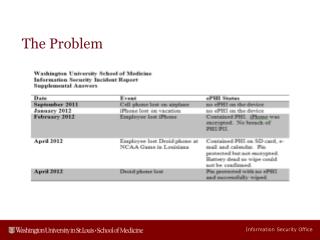
The Technical Architecture Group (TAG) has reviewed and updated mobile device security policies for accessing our Exchange environments. Key recommendations include mandatory password usage for all mobile devices, with a minimum of 4 numeric characters that cannot be easily guessed (e.g., 1111 or 1234). Two security policies will be in effect: an ePHI/encrypted policy for devices storing sensitive information and a non-encrypted policy for others. Non-compliant devices will lose email access, and users must re-certify annually under the non-encrypted policy.

The Problem
E N D
Presentation Transcript
Upcoming changes in Mobile Device Security • The Technical Architecture Group (TAG) has reviewed the security policy options for mobile devices that connect to our Exchange environments • Recommendations Include • All mobile devices connected to Exchange will require a password • At least 4 numeric characters • Password can not be simple e.g. 1111 or 1234 • Two security policies active • For devices that may store ePHI an ePHI or encrypted policy • For devices that do not store ePHI a non-encrypted policy • Default policy will be ePHI/encrypted policy • Exception Form will need to be completed and signed to move to non-encrypted policy • Non-encrypted policy users will need to re-certify annually
Impact to staff and faculty • Devices that do not support these server policies will cease to get e-mail • If password is entered incorrectly 10 times the device is wiped
Things to ask when getting a new device • I will be connecting this device to my work e-mail • They require ActiveSync enforced • Pin/Password • Encryption • Will this phone/tablet support these requirements