M-CUBED Token Request for Research Proposal Submission
40 likes | 152 Vues
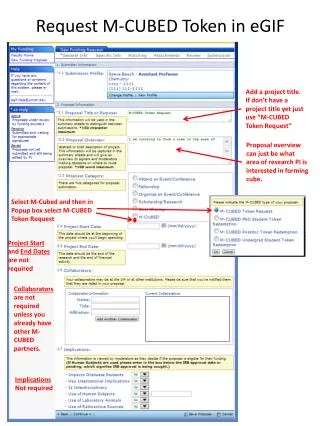
This document outlines the process for requesting an M-CUBED token within the eGIF system for a research proposal. If you do not have a project title yet, use "M-CUBED.Token.Request." Indicate your area of research interest related to forming a cube. After selecting M-CUBED, choose M-CUBED.Token.Request in the pop-up box. Note that project dates and collaborators are not required unless you have existing partners. There’s no need for implications or file uploads. Once complete, just click continue, and submit your proposal for approval.


M-CUBED Token Request for Research Proposal Submission
E N D
Presentation Transcript
Add a project title. If don’t have a project title yet just use “M-CUBED Token Request” Request M-CUBED Token in eGIF Proposal overview can just be what area of research PI is interested in forming cube. Select M-Cubed and then in Popup box select M-CUBED Token Request Project Start and End Dates are not required Collaborators are not required unless you already have other M-CUBED partners. Implications Not required
Request M-CUBED Token in eGIF This is all that should show up on this page. Just click continue.
Request M-CUBED Token in eGIF Don’t need to upload any files. Just click continue.
Request M-CUBED Token in eGIF Done with application. Click Submit Proposal for Approval
![[I/O] ³ Input/Output Cubed](https://cdn1.slideserve.com/1581633/slide1-dt.jpg)
![[I/O] ³ Input/Output Cubed](https://cdn1.slideserve.com/1583783/slide1-dt.jpg)