Company Role: Setting Up of Employees with Location and Cashbook | User Role: Permission Management in Branch Setting
This system facilitates the setup of employees, location, and cashbook in a company. Grant and manage user permissions effectively based on roles. Ensure default branch settings for easy employee management. Manage items, GL codes, opening balances, and clean up data efficiently. Handle supplier, customer, creditor, debtor transactions. Generate credit notes, settlements, deposits, and reports seamlessly. Securely manage financial operations like procurement, distribution, trading, and inventory. Streamline finance and accounting tasks with payment and receipt vouchers. Keep accurate records in the cashbook.
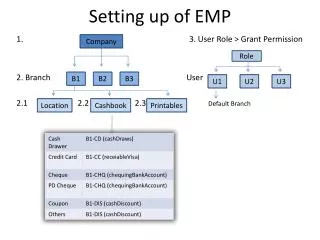

Company Role: Setting Up of Employees with Location and Cashbook | User Role: Permission Management in Branch Setting
E N D
Presentation Transcript
Company Role B1 B2 B3 Setting up of EMP U1 U2 U3 Location Cashbook Printables 1. 3. User Role > Grant Permission 2. Branch User 2.1 2.2 2.3 Default Branch
Setting up of EMP 4. Items 5. Chart of Account (GL Code) 6. Opening 7. Financial Year 8. Clean up opening data - One time supplier - Journal Transaction (Jtxn) YES NO
Operations Procurement/ Purchase Distribution Trading Inventory
Supplier Customer Creditor / AccPayable / AP Debtor / AccReceivable / AR CN (Credit Note) Settlement Deposit Credit Memo DN (Debit Note) CN (Credit Note) Credit Memo Reports DN (Debit Note) Reports
Finance Accounting Payment Voucher Receipt Voucher Cashbook