Download
1 / 23
Go to http://portal.kfupm.edu.sa
230 likes | 786 Vues
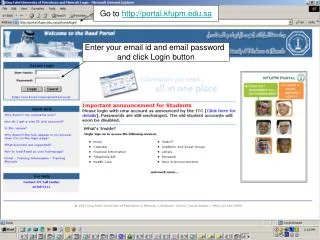
Go to http://portal.kfupm.edu.sa. Enter your email id and email password and click Login button. Click Registrar Services Tab. Click here to check your Class Standing . Select the term and click submit button. Check your Class Standing here. Click here to see Course Offerings.

Télécharger la présentation 
Go to http://portal.kfupm.edu.sa
An Image/Link below is provided (as is) to download presentation
Download Policy: Content on the Website is provided to you AS IS for your information and personal use and may not be sold / licensed / shared on other websites without getting consent from its author.
Content is provided to you AS IS for your information and personal use only.
Download presentation by click this link.
While downloading, if for some reason you are not able to download a presentation, the publisher may have deleted the file from their server.
During download, if you can't get a presentation, the file might be deleted by the publisher.
E N D
Presentation Transcript
Go to http://portal.kfupm.edu.sa Enter your email id and email password and click Login button
Enter Course Reference no. (Call no.) then click “submit changes” button
Select the Program and click Generate Request button
Select the degree completion requirements and Click Submit button
If you see errors on any channel, you can access Banner Self Service Web directly by clicking here






More Related