Download
1 / 6
Merke og lagre punkt
60 likes | 186 Vues
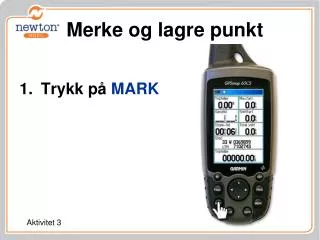
Merke og lagre punkt. Trykk på MARK. Aktivitet 3. Bruk piltastene til å gå opp til øverste rute. Skriv inn Leir . Du bruker piltastene til å gå til bokstavene og ENTER for å bekrefte bokstaven.

Télécharger la présentation 
Merke og lagre punkt
An Image/Link below is provided (as is) to download presentation
Download Policy: Content on the Website is provided to you AS IS for your information and personal use and may not be sold / licensed / shared on other websites without getting consent from its author.
Content is provided to you AS IS for your information and personal use only.
Download presentation by click this link.
While downloading, if for some reason you are not able to download a presentation, the publisher may have deleted the file from their server.
During download, if you can't get a presentation, the file might be deleted by the publisher.
E N D
Presentation Transcript
Merke og lagre punkt Trykk på MARK Aktivitet 3
Skriv inn Leir. • Du bruker piltastene til å gå til bokstavene og ENTER for å bekrefte bokstaven.
Når du er ferdig men å skrive navnet velger du OK og trykker ENTER for å bekrefte navnet.











More Related