Understanding Wireframes and Utilizing Visio for Effective Design
This guide explores the concept of wireframes as visual representations of content layout in applications. From both developer and client perspectives, wireframes serve to clarify requirements, inspire creativity, and ensure alignment between stakeholders. Various tools for wireframing are discussed, highlighting Visio's benefits, including its all-in-one capabilities and portability. Additionally, resources to obtain Visio and enhance your wireframing process are provided. This comprehensive overview is essential for anyone involved in design and development workflows.

Understanding Wireframes and Utilizing Visio for Effective Design
E N D
Presentation Transcript
Wireframes and Visio by Arvind Nanjundappa
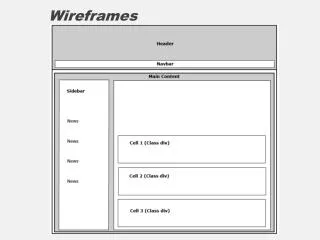
What is this Wireframe?? • A Formal Definition A Wireframe is basically a visual representation of content layout in the application. • Developer Perspective A Maze of dots which could be joined by developer to visualize the Big Picture. • Client / Business Perspective A Initial stage deliverable, which makes sure both parties are on same page.
Benefits of Wireframing Designers / Developers Perspective • It can inspire the designer, resulting in a more fluid creative process. • Places where clients are not sure of requirements Initially. • Make sure all artifacts are in place.(POC’s, images etc…) • It gives the developer a clear picture of the elements that they will need to code Client / Business Perspective • It gives the client an early, close-up view of the Application. (Or a chance to get it re-designed ) • Clarify any misunderstandings in the Requirements • A piece of document very needy during transition…
A Common Misunderstanding Is Wireframe only for websites?? NO
Tools for Wireframing • Hand Sketching • Free Tool (e.g. Gliffy, Droid Draw, MS Paint) • Online Paid site (http://app.mockflow.com) • Paid (e.g. Visio) • Plug-in for Eclipse (e.g. Wireframe Sketcher)
Why Visio ?? • Primarily because it is : All in One Store Database Modeling tool UML designing tool Use Case Activity tool Wireframing tool ………… • Secondly the portability of your design different format (Exception pre-generated code) • Lastly Our school has a tie up with MSDN and we are privileged enough to get a licensed free copy
Where can you get Ur Visio copy? • http://msdn01.e-academy.com/uta_cseng • Log-In Search for Visio, download a copy • You have a setup file if you unzip ,run the same -> Register your copy. • We can add a stencil to the current Visio version which makes Wireframing for Android easy. Free Stencil : http://www.artfulbits.com/Android/Stencil.aspx
References • http://office.microsoft.com/en-us/visio-help/a-beginner-s-guide-to-visio-2007-HA010214494.aspx • http://artfulbits.com/Android/Stencil.aspx • http://app.mockflow.com
Thank You !! Questions ?