Understanding Breadboards: Construction, Benefits, and Guidelines for Electronics Projects
This presentation covers the essentials of breadboards, a reusable platform for building temporary electronic circuits. It explains how breadboards work, including the internal connections that facilitate easy component placement. We discuss the advantages of using breadboards over printed circuit boards (PCBs), highlighting the time and cost efficiency they provide during circuit development and testing. Finally, we outline key guidelines and tips for effective breadboarding, including best practices for wiring and layout to simplify troubleshooting.


Understanding Breadboards: Construction, Benefits, and Guidelines for Electronics Projects
E N D
Presentation Transcript
The Breadboard • This presentation will • Explain what a breadboard is. • Identify reasons for using a breadboard. • Review the guidelines and tips for proper breadboarding.
What is a Breadboard? A breadboard, sometimes called a proto-board, is a reusable platform for temporarily built electronic circuits.
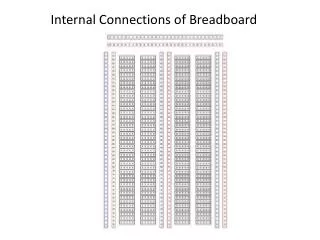
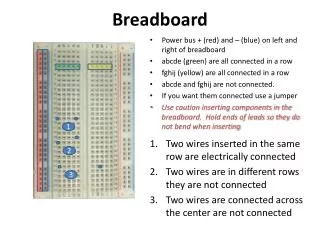
How A Breadboard Works Top View • Electric component leads and the wire used to connect them are inserted into holes that are arranged in a grid pattern on the surface of the breadboard. • A series of internal metal strips serve as jumper wires. They connect specific rows of holes. Cut-Away View
Why Breadboard? • It takes less time (and money) to breadboard a circuit than to design and fabricate a printed circuit board (PCB). Because of the cost, a PCB should be reserved for the final working design. • As a complement to circuit simulation, breadboarding allows the designer to see how, and if, the actual circuit functions.
Why Breadboard? • Breadboards give the designer the ability to quickly change components during development and testing, such as swapping resistors or capacitors of different values. • A breadboard allows the designer to easily modify a circuit to facilitate measurements of voltage, current, or resistance.
Breadboard: Guidelines and Tips • Use as few jumper wires as possible. The breadboard should be used to make the majority of the connections between the components. • Keep jumper wires as short as possible. A jumble of wires is difficult to troubleshoot. • Breadboard a circuit so that it looks as close as possible to the layout of the schematic circuit. This makes troubleshooting easier.
Breadboard: Guidelines and Tips • Place IC chips in the middle of the breadboard. • Work from a schematic and check off the component and wires as they are implemented on the breadboard. • Cut component leads to manageable lengths. Component leads that are too long may touch and short each other out. • Have someone check your circuit for errors.