Essential Microsoft Word 2010 Functions for Document Formatting
Explore key features of Microsoft Word 2010, including the control center beneath the title bar, text formatting effects like italicization, and the crucial first-save document actions. Learn how to manage the ribbon for efficient navigation, switch between different ribbons, and access essential commands in the Home and Review ribbons. This guide covers critical aspects such as text placement, accepting or rejecting changes, and applying highlights effectively, ensuring users enhance their document presentation with ease.

Essential Microsoft Word 2010 Functions for Document Formatting
E N D
Presentation Transcript
57. What is the control center located below the title bar at the top of the Word 2010 window called? • A. Task Pane • B. Tab • C. Ribbon • D. Groups Microsoft word Lesson 1
58. To give a slanted appearance to text in a document, which character formatting effect is applied? • A. Superscript • B. Strikethrough • C. Subscript • D. Italic
59. What action is necessary when saving a document for the first time in Microsoft Word 2010? • A. A file name must be assigned to the document • B. Margin settings must be established • C. Non-printing characters must be activated • D. Print settings must be established
60. On the Title bar, which button may be selected to display only tab names rather than entire ribbons in the Word 2010 window? • A. Shrink the Ribbon • B. Hide the Ribbon • C. Decrease the Ribbon • D. Minimize the Ribbon
61. How do users switch from one ribbon to another in Word 2010? • A. Use any arrow key on the keyboard • B. Use the Page Up or Page Down keys on the keyboard • C. Click the tab of the ribbon they wish to access • D. Shift + Tab to move to the next ribbon
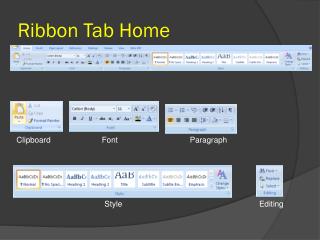
A. Font • B. Paragraph • C. Editing • D. Modify 62. Which group on the Home Ribbon contains commands to control the placement of text in a document?
63. What group in the Review Ribbon contains the command to accept or reject changes made to a document? • A. Proofing • B. Compare • C. Tracking • D. Changes
64. To apply color to text or paragraphs to make them appear to be highlighted with a marker or pen, which command on the Home Ribbon is used? • A. Text Effects • B. Text Highlight Color • C. Shading • D. Color
A. Home • B. Insert • C. View • D. Page Layout 65. Which ribbon is used to effect the page background of a document?