
SlideServe
Menu
Préférences
© SlideServe · v2026

Hierarchical Occlusion Map

salma avatar
20 diapositives · 440 Views · Jul 14, 2014

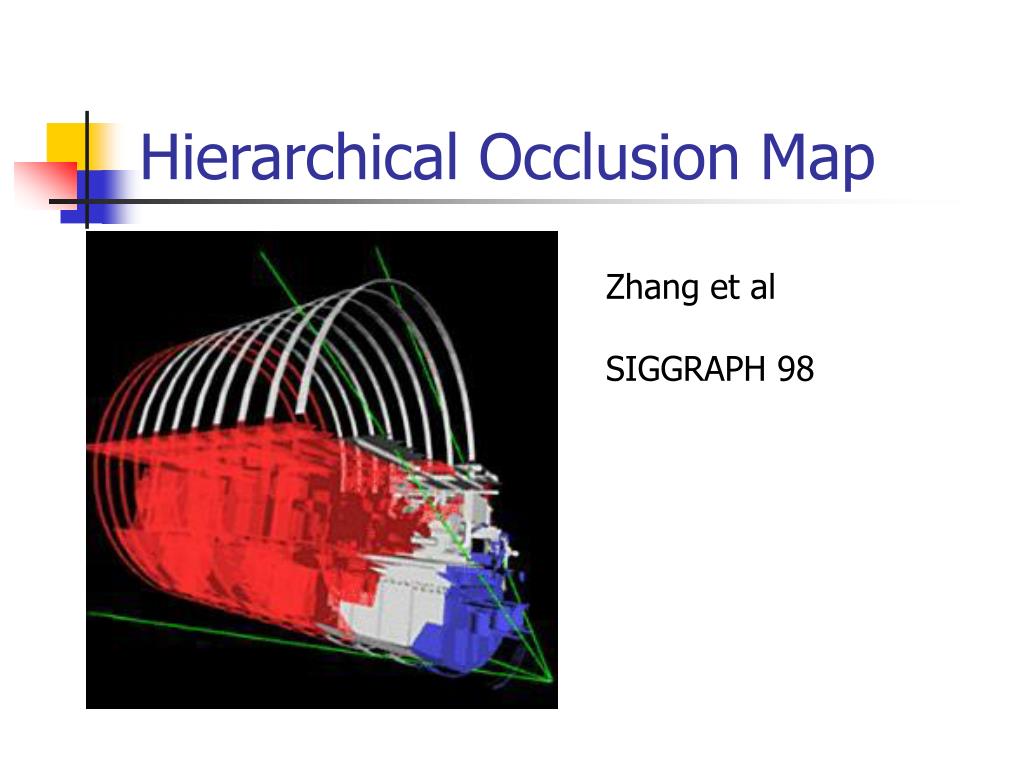
Hierarchical Occlusion Map . Zhang et al SIGGRAPH 98. Basic Ideas. Choose a set of graphics objects from the scene as Occluder Use the occluder to define Occlusion Map (hierarchically) Compare the rest of scene against the occlusion map . Example. Blue: Occluders Red: Occludees.
Hierarchical Occlusion Map - slide 1
01 / 20Hierarchical Occlusion Map
1 / 17

Télécharger la présentation

Hierarchical Occlusion Map
Une image / un lien ci-dessous est fourni (tel quel) pour télécharger la présentation

Politique de téléchargement : le contenu du site vous est fourni TEL QUEL pour votre information et votre usage personnel ; il ne peut être vendu, concédé sous licence ni partagé sur d’autres sites sans l’accord de son auteur.Le contenu vous est fourni TEL QUEL, pour votre information et votre usage personnel uniquement. Téléchargez la présentation en cliquant sur ce lien. Lors du téléchargement, si vous ne parvenez pas à télécharger une présentation, l’éditeur a peut-être supprimé le fichier de son serveur.Pendant le téléchargement, si vous ne parvenez pas à obtenir une présentation, le fichier a peut-être été supprimé par l’éditeur.

F I N

Plus de contenu associé

Transcription de la présentation
  1. Hierarchical Occlusion Map Zhang et al SIGGRAPH 98

  2. Basic Ideas • Choose a set of graphics objects from the scene as Occluder • Use the occluder to define Occlusion Map (hierarchically) • Compare the rest of scene against the occlusion map

  3. Example Blue: Occluders Red: Occludees

  4. Occluder Viewing Frustum Occluder Rendering Database Culling Selection Build Occlusion Map Hierarchy Real Viewing Frustum Occlusion Test Scene Culling Algorithm Pipeline

  5. 2-Step Occlusion Test • Overlap Test • Overlap Test Overlap + Depth = Occlusion

  6. Why decomposition? • The occlusion test is done approximately (conservatively) • We can afford to be more conservative in depth test than overlap test

  7. Why Decomposition?

  8. Overlap Test – Occlusion Map • Representation of projection for overlap test: occlusion map • A gray scale image – each pixel represents one block of screen region • Generate by rendering occluders

  9. Occlusion Map (OM) • Each pixel of the occlusion map has an opacity, which represents the ratio of the sum of the opaque areas in the block to the total area. • If fully covered, p= 1, if anti-alised pixel, p <1) • Occlusion map: the alpha channel of an image

  10. Overlap Test using OM For each potential occludee, we can scan-convert it and compare against the opacity of the pixels it overlaps Expensive!! • Conservative Approximation: use the screen-space • bounding box of the occludee (a superset of the actual • covered pixels) • If all the pixels inside the bounding box are opaque, • the object is occluded.

  11. Hierarchical Occlusion Map Like hierarchical Z-buffer, we can create a hierachy to speed up the comparison (for large objects) The low resolution pixel is an average of the high resolution pixels

  12. Overlap Test using HOM Basic Algorithm • Start from the lowest resolution • If the pixel cover the bounding • rectangle has a value 1, • the object is occluded • Otherwise traverse down the • hierarchy: • If all children =1: occluded • If all children =0; not occluded • Otherwise, traverse down further

  13. Approximate Overlap Test • Instead of concluding an object is occluded only when the bounding box is within pixels with opacity 1, we can use an threshold between [0,1] • Early termination in the high level of the hierarchy • What does it mean when a block has high opacity but not one? This is the unique feature of HOM !!

  14. Depth Test (1) Approximate Z (depth) test: • A single Z Plane A single Z plane to separate the occluders from occludees.

  15. Depth Test (2) • Break the screen into small regions • Build at each frame • Instead of using Z-buffer, use • the occluder’s bounding • volume’s farthest Z • Compare each potential • occludee’s nearest Z (con- • servative test)

  16. Occluder Selection Ideal occluder: the visible objects – it’s a joke View-dependent occluder: too expensive (m^6 log m) – Wow! Solution: Estimate and build an occluder database Discard objects that do not server as good occluders

  17. Occluder Selection (2) • Size: not too small • Redundant: detail polygons (clock on the wall) • Complexity: Complex polygons are not preferred (why?) • Done at run time – sort the occluders in depth, add them in order until reach the polygon count.

  18. Discussion • Robust • Very little assumption about hardware • Need high depth complexity • Adpative occlusion culling

  19. Hardware Support • Most of the aforementioned algorithms need to be done by applications (software) • Hardware support is emerging – • Example HP Visualize fx board (1997)

  20. HP hardware occlusion • Extend the OpenGL – add a OCCLUSION_MODE • The bounding box of an object is scan converted first • A flag is set if any pixel of the BB faces is visible • Only need to read back one flag, instead of the entire frame buffer • Tradeoff – valueable rendering time is used to render useless BB faces (need to be used wisely) • Reportedly 25%-100% speedup were observed