
CONFIGURATION AND SENSOR LAYOUT

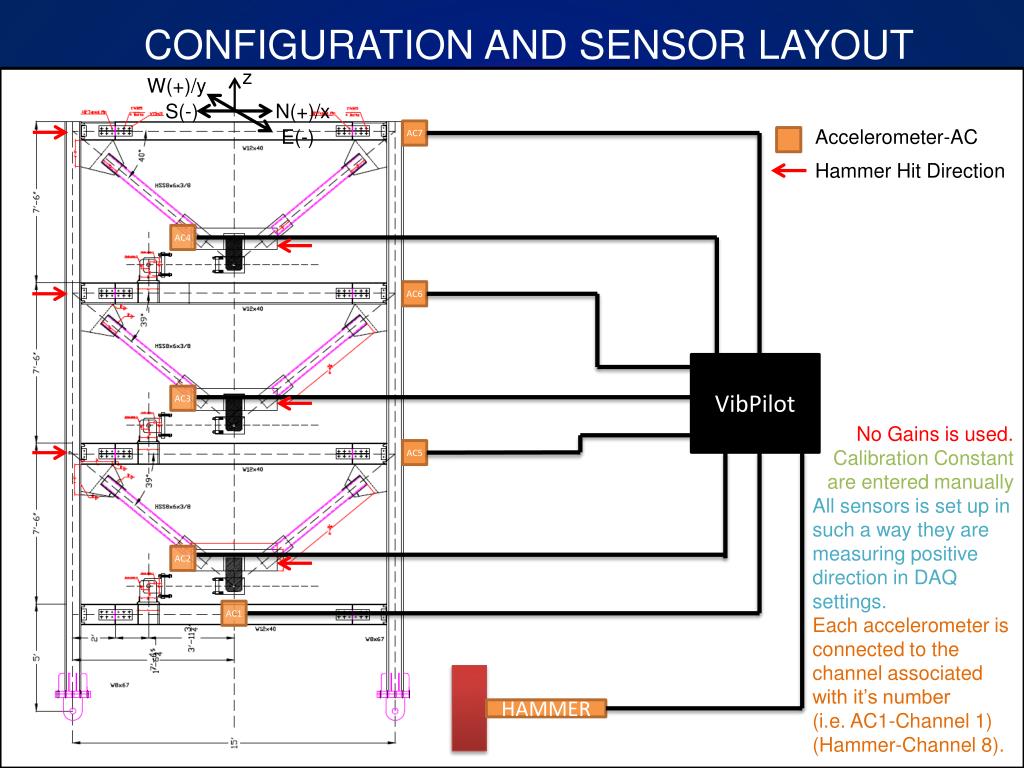
This document outlines the complete configuration and sensor layout for accelerometer testing, detailing the setup for measuring both in-plane and out-of-plane motions. Each sensor is calibrated with manually entered constants, ensuring precision in data acquisition. The system connects each accelerometer to its designated channel, with the hammer impact registered on Channel 8. Comprehensive details for in-plane and out-of-plane motion sensors are included, ensuring thorough documentation and guidelines for accurate measurement and testing procedures.
Télécharger la présentation 
Politique de téléchargement : le contenu du site vous est fourni TEL QUEL pour votre information et votre usage personnel ; il ne peut être vendu, concédé sous licence ni partagé sur d’autres sites sans l’accord de son auteur.Le contenu vous est fourni TEL QUEL, pour votre information et votre usage personnel uniquement. Téléchargez la présentation en cliquant sur ce lien. Lors du téléchargement, si vous ne parvenez pas à télécharger une présentation, l’éditeur a peut-être supprimé le fichier de son serveur.Pendant le téléchargement, si vous ne parvenez pas à obtenir une présentation, le fichier a peut-être été supprimé par l’éditeur.
F I N