Download
1 / 1
10 likes | 135 Vues
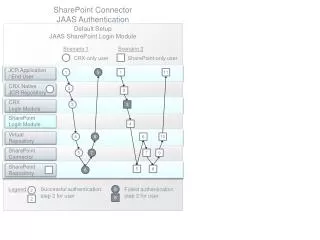
This document outlines the configuration and implementation of the SharePoint Connector JAAS Authentication. It details two user scenarios; CRX-only users and SharePoint-only users, covering the necessary steps for successful authentication. The guide includes information on the JCR Application, relevant Login Modules, and error handling for failed authentication attempts. It serves as a comprehensive resource for understanding the SharePoint Connector and its integration with the JAAS authentication framework, ensuring users can authenticate effectively and troubleshoot any issues.

E N D
SharePoint Connector JAAS Authentication Default Setup JAAS SharePoint Login Module Scenario 1 Scenario 2 CRX-only user SharePoint-only user JCR Application / End User 1 9 1 11 CRX Native JCR Repository 2 2 CRX Login Module 3 3 SharePoint Login Module 4 Virtual Repository 4 8 6 10 SharePoint Connector 5 7 7 9 SharePoint Repository 5 8 6 Successful authentication step 2 for user Legend Failed authentication step 2 for user 8 2 8 2