Introduction to Microsoft Word's Standard Toolbar for Beginners
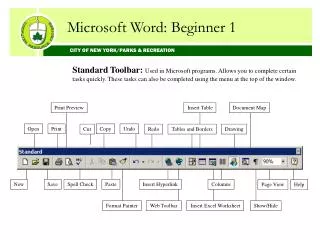
This guide introduces the Standard Toolbar in Microsoft Word, particularly useful for beginners. The toolbar provides quick access to essential tasks such as Print Preview, Insert Table, Open, Save, and more. Users can complete these tasks efficiently without navigating the menu at the top of the window. This user-friendly layout enhances productivity and makes document management easier. Learn how to utilize features like Copy, Paste, and Spell Check to streamline your Word processing experience.

Introduction to Microsoft Word's Standard Toolbar for Beginners
E N D
Presentation Transcript
Microsoft Word: Beginner 1 CITY OF NEW YORK/PARKS & RECREATION Standard Toolbar: Used in Microsoft programs. Allows you to complete certain tasks quickly. These tasks can also be completed using the menu at the top of the window. Print Preview Insert Table Document Map Open Print Copy Undo Cut Redo Tables and Borders Drawing New Save Spell Check Paste Insert Hyperlink Columns Page View Help Format Painter Web Toolbar Insert Excel Worksheet Show/Hide