Concept maps
Concept maps are powerful tools for visually representing information, enhancing comprehension and retention. By organizing data hierarchically or through flow charts, they clarify complex ideas, making it easier for our brains to process and draw connections. There are various types, including hierarchical maps, flow charts, and spider maps, each serving specific purposes. Constructing a concept map involves five key steps: selecting a theme, ranking concepts, clustering related ideas, arranging them diagrammatically, and linking with labeled connections. These maps are essential for structuring reports and analyzing problems effectively.

Concept maps
E N D
Presentation Transcript
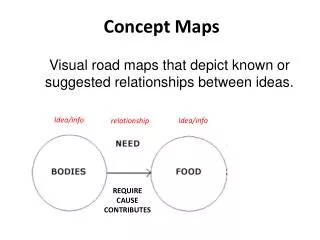
What is: • a method to represent information visually • we can better understand information • easier for our brain to make meaning “A picture is worth a thousand words”
Types hierarchical map spider map flow-chart
Hierarchical map • hierarchical map (allows dividing the problem into levels)
Flow chart • flow-chart (pictorial representation describing the process analysis; very useful when examining how various steps in the process work together)
Spider map • Spider map (organises information by placing the central theme or the unifying concept in the centre, outwardly radiating sub-themes around the centre of the map. These may be further developed into mind maps
FIVE STEPS IN CONSTRUCTING CONCEPT MAPS (http://www.schoolnet.edu.mo/general/biology/temp/cmap/cmapguid.html) • Select • Focus on a theme and then identify related key words or phrases. • Rank • Rank the concepts (key words) from the most abstract and inclusive to the most concrete and specific.Cluster • Cluster concepts that function at similar level of abstraction and those that interrelate closely.Arrange • Arrange concepts in to a diagrammatic representation.Link and label • Link concepts with linking lines and label each line.
A good concept map can: • understand the problem • help you structure the report
Over to you now: Design a concept (mind) map related to your project, following the 5- step procedure: 1. Select 2. Rank 3. Cluster 4. Arrange 5. Link & label