
Effective Strategies for Selling Backup Exec Solutions in Virtualization and Cloud Environments

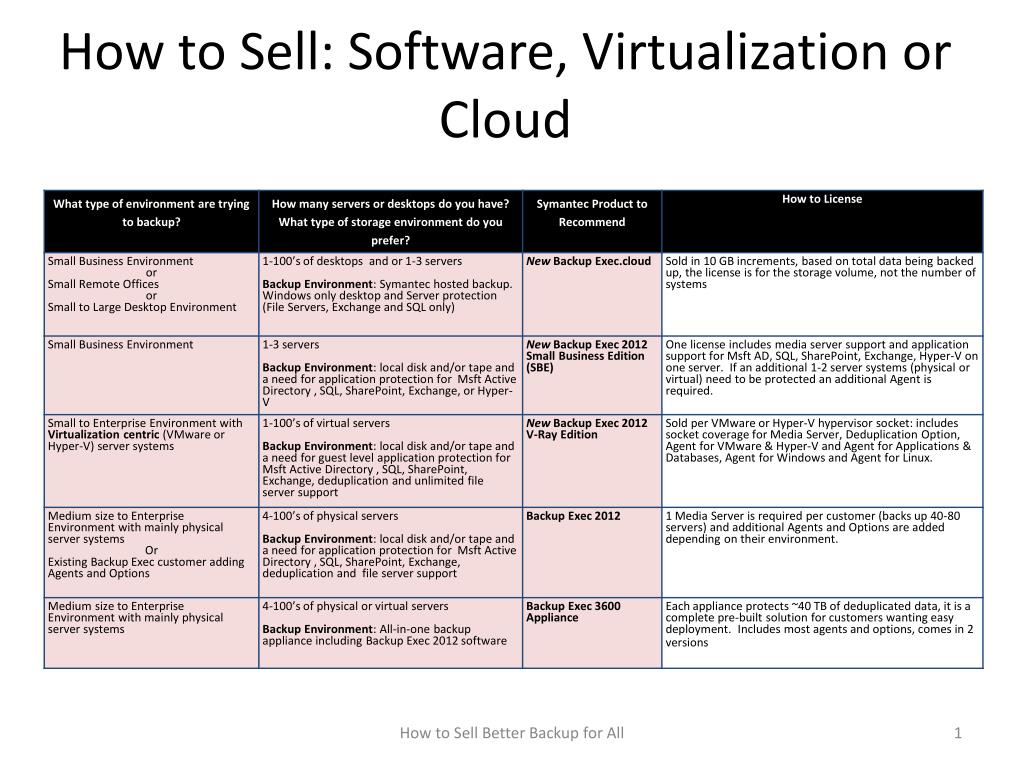
Discover essential strategies for selling Backup Exec software and cloud solutions tailored for businesses, whether they have 3 servers or over 20. Learn when to recommend different editions, such as Backup Exec 2012 for small businesses and larger organizations. Understand the licensing and capacity considerations, including support for Exchange, SQL, Active Directory, and SharePoint. Equip yourself with knowledge about appliances and services suitable for remote workers and small IT teams. Unlock your potential in selling robust backup solutions effectively!
Télécharger la présentation 
Politique de téléchargement : le contenu du site vous est fourni TEL QUEL pour votre information et votre usage personnel ; il ne peut être vendu, concédé sous licence ni partagé sur d’autres sites sans l’accord de son auteur.Le contenu vous est fourni TEL QUEL, pour votre information et votre usage personnel uniquement. Téléchargez la présentation en cliquant sur ce lien. Lors du téléchargement, si vous ne parvenez pas à télécharger une présentation, l’éditeur a peut-être supprimé le fichier de son serveur.Pendant le téléchargement, si vous ne parvenez pas à obtenir une présentation, le fichier a peut-être été supprimé par l’éditeur.
F I N