GVSU Email Conversion Process Steps for Faculty and Staff
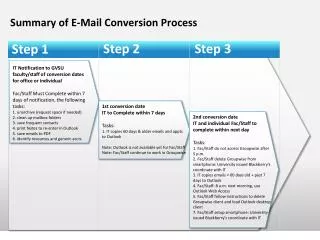
This document outlines the email conversion process for GVSU faculty and staff. The process is divided into three steps, each with specific tasks that need to be completed within a designated timeframe. Faculty and staff will be informed of the conversion dates and are required to unarchive, clean up mailbox folders, save contacts, print notes, and save emails to PDF. The IT department will assist with copying emails and appointments to Outlook. Important instructions are provided for accessing Outlook and transitioning from Groupwise.

GVSU Email Conversion Process Steps for Faculty and Staff
E N D
Presentation Transcript
Summary of E-Mail Conversion Process Step 2 Step 3 Step 1 • IT Notification to GVSU faculty/staff of conversion dates • for office or individual • Fac/Staff Must Complete within 7 days of notification, the following tasks: • 1. unarchive (request space if needed) • 2. clean up mailbox folders • 3. save frequent contacts • 4. print Notes to re-enter in Outlook • 5. save emails to PDF • 6. identify resources and generic accts May June • 1st conversion date • IT to Complete within 7 days • Tasks: • 1. IT copies 60 days & older emails and appts to Outlook • Note: Outlook is not available yet for Fac/Staff • Note: Fac/Staff continue to work in Groupwise • 2nd conversion date • IT and individual Fac/Staff to complete within next day • Tasks: • 1. Fac/Staff do not access Groupwise after 5 p.m. • 2. Fac/Staff delete Groupwise from smartphone: University issued Blackberry's coordinate with IT • 3. IT copies emails < 60 days old + past 7 days to Outlook • 4. Fac/Staff: 8 a.m. next morning, use Outlook Web Access • 5. Fac/Staff follow instructions to delete Groupwiseclient and load Outlook desktop client • 7. Fac/Staff setup smartphone: University issued Blackberry's coordinate with IT