ATM Service Request and Status Check with Co-op Bank and Sacco Network
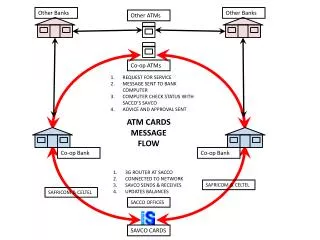
This message details the service process for ATM requests sent to Co-op Bank's computer system. It highlights the interaction between Sacco’s SAVCO for advice and approval, as well as the importance of checking the status of service requests. The system utilizes a 3G router connected to the Sacco network, enabling SAVCO to send and receive updates on ATM card balances effectively. This ensures that users remain informed of their transactions with Safaricom and Celtel services through updated systems at Sacco offices.

ATM Service Request and Status Check with Co-op Bank and Sacco Network
E N D
Presentation Transcript
Other Banks Other Banks Other ATMs Co-op ATMs REQUEST FOR SERVICE MESSAGE SENT TO BANK COMPUTER COMPUTER CHECK STATUS WITH SACCO’S SAVCO ADVICE AND APPROVAL SENT ATM CARDS MESSAGE FLOW Co-op Bank Co-op Bank 3G ROUTER AT SACCO CONNECTED TO NETWORK SAVCO SENDS & RECEIVES UPDATES BALANCES SAFRICOM & CELTEL SAFRICOM & CELTEL SACCO OFFICES SAVCO CARDS