

SlideServe
Menu
Préférences
© SlideServe · v2026

Keyboard Shortcuts

tola avatar
2 diapositives · 241 Views · Jul 27, 2014

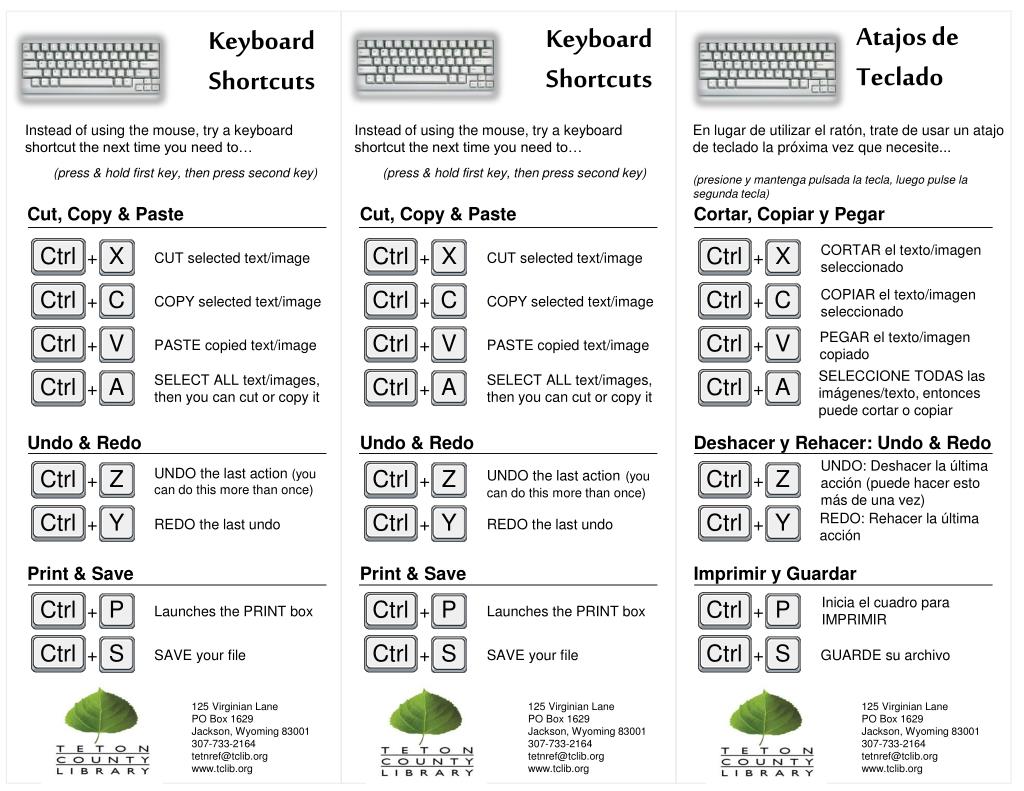
Atajos de Teclado. Keyboard Shortcuts. Keyboard Shortcuts. En lugar de utilizar el ratón, trate de usar un atajo de teclado la próxima vez que necesite... (presione y mantenga pulsada la tecla, luego pulse la segunda tecla).
Keyboard Shortcuts - slide 1
01 / 2Keyboard Shortcuts
1 / 17

Télécharger la présentation

Keyboard Shortcuts
Une image / un lien ci-dessous est fourni (tel quel) pour télécharger la présentation

Politique de téléchargement : le contenu du site vous est fourni TEL QUEL pour votre information et votre usage personnel ; il ne peut être vendu, concédé sous licence ni partagé sur d’autres sites sans l’accord de son auteur.Le contenu vous est fourni TEL QUEL, pour votre information et votre usage personnel uniquement. Téléchargez la présentation en cliquant sur ce lien. Lors du téléchargement, si vous ne parvenez pas à télécharger une présentation, l’éditeur a peut-être supprimé le fichier de son serveur.Pendant le téléchargement, si vous ne parvenez pas à obtenir une présentation, le fichier a peut-être été supprimé par l’éditeur.

F I N

Plus de contenu associé

Transcription de la présentation
  1. Atajos de Teclado Keyboard Shortcuts Keyboard Shortcuts En lugar de utilizar el ratón, trate de usar un atajo de teclado la próxima vez que necesite... (presione y mantenga pulsada la tecla, luego pulse la segunda tecla) Instead of using the mouse, try a keyboard shortcut the next time you need to… (press & hold first key, then press second key) Instead of using the mouse, try a keyboard shortcut the next time you need to… (press & hold first key, then press second key) Cut, Copy & Paste Cut, Copy & Paste Cortar, Copiar y Pegar CORTAR el texto/imagen seleccionado CUT selected text/image CUT selected text/image COPIAR el texto/imagenseleccionado COPY selected text/image COPY selected text/image PEGAR el texto/imagencopiado Ctrl Ctrl Ctrl Ctrl Ctrl Ctrl Ctrl Ctrl Ctrl Ctrl Ctrl Ctrl Ctrl Ctrl Ctrl Ctrl Ctrl Ctrl Ctrl Ctrl Ctrl Ctrl Ctrl Ctrl C C C X X A P Y S P V Y P S A A V V S X Y Z Z Z + + + + + + + + + + + + + + + + + + + + + + + + PASTE copied text/image PASTE copied text/image SELECCIONE TODAS las imágenes/texto, entonces puede cortar o copiar SELECT ALL text/images, then you can cut or copy it SELECT ALL text/images, then you can cut or copy it Undo & Redo Undo & Redo Deshacer y Rehacer: Undo & Redo UNDO: Deshacer la última acción (puede hacer esto más de una vez) UNDO the last action(you can do this more than once) UNDO the last action (you can do this more than once) REDO: Rehacer la última acción REDO the last undo REDO the last undo Print & Save Print & Save Imprimir y Guardar Inicia el cuadro para IMPRIMIR Launches the PRINT box Launches the PRINT box SAVE your file SAVE your file GUARDE su archivo 125 Virginian Lane PO Box 1629 Jackson, Wyoming 83001 307-733-2164 tetnref@tclib.org www.tclib.org 125 Virginian Lane PO Box 1629 Jackson, Wyoming 83001 307-733-2164 tetnref@tclib.org www.tclib.org 125 Virginian Lane PO Box 1629 Jackson, Wyoming 83001 307-733-2164 tetnref@tclib.org www.tclib.org

  2. Keyboard Shortcuts Atajos de Teclado Keyboard Shortcuts (continued) (continued) (continúa) Find & Replace Find & Replace Buscar y Reemplazar BUSCAR texto en un documento o en una página web FIND text in a document or on a webpage FIND text in a document or on a webpage REEMPLAZAR un texto determinado con otro texto Replace certain text with other text Replace certain text with other text Aumentar/disminuir el tamaño del texto Increase/Decrease Text Size Increase/Decrease Text Size AUMENTAR el tamaño del texto INCREASE text size INCREASE text size Tab Tab Tab Print Screen Print Screen Print Screen Print Screen Print Screen Print Screen Ctrl Ctrl Ctrl Ctrl Ctrl Ctrl Ctrl Ctrl Ctrl Ctrl Ctrl Ctrl Alt Alt Alt Alt Alt Alt H H H F F F + + + - - - + + + + + + + + + + + + DISMINUIR el tamaño del texto DECREASE text size DECREASE text size Switch Programs Switch Programs Cambiarprogramas Allows you to toggle through all of your open programs Allows you to toggle through all of your open programs Permite cambiar a través de todos los programas abiertos + + + Capture Screenshot Capture Screenshot Captura la imagen "Toma una fotografía" de toda la pantalla y lo copia en el portapapeles "Takes a picture" of your entire screen and copies it to the clipboard "Takes a picture" of your entire screen and copies it to the clipboard Copies just the active window to the clipboard Copies just the active window to the clipboard Copia sólo la ventana activa al portapapeles + + + Mac Users: Use the Apple/Command key instead of the Windows Ctrl key Mac Users: Use the Apple/Command key instead of the Windows Ctrl key Usuarios de Mac: Use la tecla Apple/ Comando en lugar de la tecla de Windows Ctrl