Kinecting the Dots with the Kinect SDK
Dive into the world of Kinect with this comprehensive guide by Michael Crump, a Silverlight MVP and Telerik XAML Evangelist. Learn how to leverage the Kinect’s advanced capabilities such as 3D depth sensors, RGB camera, and skeletal tracking to build exciting applications. Whether for gaming, hacking, or commercial projects, this guide outlines what you need to get started, including hardware and software requirements, installation steps, and new features in the SDK. Join the revolution in interactive experiences with Kinect!

Kinecting the Dots with the Kinect SDK
E N D
Presentation Transcript
Kinecting the Dots with the Kinect SDK Michael Crump, Silverlight MVP and MCPD Telerik XAML Evangelist Web: michaelcrump.net or blogs.telerik.com/michaelcrump Twitter: @mbcrump
What can you do with the Kinect? Gaming. Hacking. Building your own commercial applications!
People have been hacking hardware forever! • CueCat • WiiMote • Roomba Vacuum Cleaners
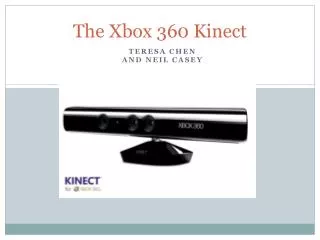
3D DEPTH SENSORS RGB CAMERA MOTORIZED TILT MULTI-ARRAY MIC
Color Image A regular video camera that has a resolution of 640x480 at 30 frames per second.
Depth Image This is a combination of a depth projector (left reticule) and sensor (right reticule) to calculate distance.
Microphone Array • A four-microphone array that is mounted as a single microphone in Windows
Motorized Tilt • The motorized tilt enables you to adjust the camera up or down 27 degrees to ensure that the camera has the best possible view of you
What do I need to get started? • Own a Kinect (Retail Version) w/ USB Cable • Use Windows 7 x64/x32 • Also works on Windows 8 Developer Preview • Visual Studio 2010 Express Edition or Better. • .NET Framework 4.0 • Download the Kinect for Windows SDK Beta 2 • DirectX SDK June 2010 or later. • Speech Platform Runtime v10.2 or later.
What’s new in Beta 2? • Accuracy has been improved overall, which gives us more precise tracking. • Skeletal Tracking is now multi-threaded and can take advantage of multiple CPU cores. • When using 2 Kinects, you can specify which does Skeletal Tracking. • API Support for detecting and managing device changes. • New C# Sample called KinectAudioDemo. • Driver and runtime stability and performance improvements.
Review the files • C:\Program Files\Microsoft SDKs\Kinect\v1.0 Beta2 – This contains the actual Kinect Sample Executablesalong with the documentation as a CHM file. • C:\Program Files\Microsoft SDKs\Kinect\v1.0 Beta2\Samples directory – Source Code • The main thing to note here is that these folders contain the source code to the applications where you can compile\build them yourself.
Links • Official Site – kinectforwindows.org • The busy developers guide to the Kinect SDK Beta http://mcrump.me/lJQU6Y
Questions?Blog: http://michaelcrump.netTwitter: @mbcrumpEmail: michael.crump@telerik.com