How to Search and Register for Online Courses
100 likes | 230 Vues
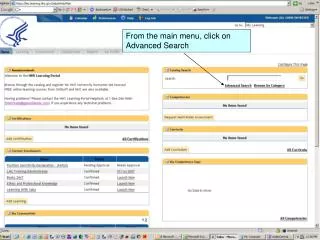
To find and register for online courses, go to the main menu and select Advanced Search. If you know the course name, type the beginning information using “%” as a wildcard. Click on Search Learning Catalog. Choose your desired course from the listings and click on the link for details. You can register from this page by clicking Register at the bottom once you’re ready. After registration, check your order status. Access My Enrollments to launch the course. Click on the highlighted link, and start learning by selecting Play this Course.


How to Search and Register for Online Courses
E N D
Presentation Transcript
If you know the name of the course that you are looking for, type the beginning information with a “%” sign as a wildcard to search for the course Click on Search Learning Catalog
Choose the course you’d like from the listing of “Learnings and Offerings...” Click on the course link to receive more details about the course itself – you can either register from the details page or from this page by… …Clicking on Register when you are ready to register for the course.
This is the detailed page (registration option at the bottom – scroll down to register.
Congratulations you are registered See order status, “Confirmed” Go to My Enrollments to launch the online class
Here the overview, duration and description for this course. To begin, click on “Play this Course”
While in the office, please use the first option, “standard version” When accessing from home, please use the second option, “web accessibility version”