Enhancing Presentation Skills: Formatting Techniques in PowerPoint
This laboratory exercise provides students with hands-on experience in formatting presentations using PowerPoint. By the end of the session, students will learn to add slides, modify fonts, format paragraphs, set page orientations, and perform spell checks. The exercise covers the use of the formatting toolbar for text adjustments, slide layouts for arranging content, and effective techniques for inserting and managing text and bullet lists. Additionally, students will explore advanced features like the Format Painter and line spacing adjustments, fostering essential skills for creating professional presentations.

Enhancing Presentation Skills: Formatting Techniques in PowerPoint
E N D
Presentation Transcript
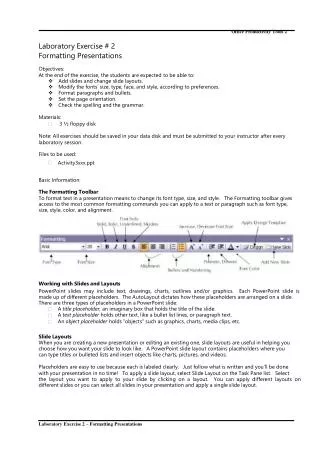
OfficeProductivityTools2 LaboratoryExercise#2 FormattingPresentations Objectives: Attheendoftheexercise,thestudentsareexpectedtobeableto: vAddslidesandchangeslidelayouts. vModifythefonts’size,type,face,andstyle,accordingtopreferences. vFormatparagraphsandbullets. vSetthepageorientation. vCheckthespellingandthegrammar. Materials: •3½floppydisk Note:Allexercisesshouldbesavedinyourdatadiskandmustbesubmittedtoyourinstructorafterevery laboratorysession. Filestobeused: • Activity3xxx.ppt BasicInformation: TheFormattingToolbar Toformattextinapresentationmeanstochangeitsfonttype,size,andstyle.TheFormattingtoolbargives accesstothemostcommonformattingcommandsyoucanapplytoatextorparagraphsuchasfonttype, size,style,color,andalignment. WorkingwithSlidesandLayouts PowerPointslidesmayincludetext,drawings,charts,outlinesand/orgraphics.EachPowerPointslideis madeupofdifferentplaceholders.TheAutoLayoutdictateshowtheseplaceholdersarearrangedonaslide. TherearethreetypesofplaceholdersinaPowerPointslide: • • • Atitleplaceholder,animaginaryboxthatholdsthetitleoftheslide. Atextplaceholderholdsothertext,likeabulletlistlines,orparagraphtext. Anobjectplaceholderholds“objects”suchasgraphics,charts,mediaclips,etc. SlideLayouts Whenyouarecreatinganewpresentationoreditinganexistingone,slidelayoutsareusefulinhelpingyou choosehowyouwantyourslidetolooklike.APowerPointslidelayoutcontainsplaceholderswhereyou cantypetitlesorbulletedlistsandinsertobjectslikecharts,pictures,andvideos. Placeholdersareeasytousebecauseeachislabeledclearly.Justfollowwhatiswrittenandyou’llbedone withyourpresentationinnotime!Toapplyaslidelayout,selectSlideLayoutontheTaskPanelist.Select thelayoutyouwanttoapplytoyourslidebyclickingonalayout.Youcanapplydifferentlayoutson differentslidesoryoucanselectallslidesinyourpresentationandapplyasingleslidelayout. LaboratoryExercise2–FormattingPresentations
OfficeProductivityTools2 Ontheotherhand,therearefourtypesofslidelayouts:Textlayouts,Contentlayouts,TextandContent Layouts,andOtherLayouts.Simplypointtotheboxesandatooltipwillappearindicatingthekindofthe layout. InsertingNewSlides Toinsertnewslides,clickontheNewSlidebuttonontheFormattingtoolbarorselectNewSlidefromthe Insertmenu.Anewslidewillappearafterthecurrentslideinyourpresentationandthelayoutthatisapplied ontheinsertedslideistheBulletedListlayout. FormattingFonts Fontssuchastype,size,andcolorcanalsobeformatted.However,therearesomeotherformattingeffects, whichyoucanapplyusingtheFontdialogboxfromtheFormatmenu.TheFontdialogboxoffersevery possiblecharacterformattingoptionsuchasaddingspecialeffectslikeshadowandemboss. InsertingText Textcanbeinsertedinseveralways: •throughtheplaceholders •throughaninsertedtextbox •enteringtextusinganAutoShapefromtheDrawingtoolbar •usingtheInsertWordArtcommand(whichwillbediscussedinthesucceedinglectures) LaboratoryExercise2–FormattingPresentations
OfficeProductivityTools2 Undo andRedo Feature ThisfeatureofanyMicrosoftOfficeapplicationallowsyoutoeditanyunintentionalactionsyou’vedoneto thepresentationoreventhoseintentionalactionthatneedstobeedited.TheUndobuttonallowsyoutogo backtotheaction/syoujustcreated. TheRedobutton,obviously,istodoagainthecurrentaction. Rememberthatwhenyouhavealreadysavedapresentation,andwantingtoundoorredoanaction, PowerPointdoesnotallowthisfeature. AboutTextBoxes Themostimportantobjectsthatyoucanaddtoyourslidesaretextboxes.Atextboxiswhereyoucanadd texttoyourpresentationwithoutusinganyplaceholdersfromthepresetslidelayouts.Addyourowntext boxesusingtheTextBoxbuttonfromtheDrawingtoolbar. Moreabouttextboxes: • • • • • • surroundedbyathindashedborderthatlookslikeatextplaceholder clickinsideitsboundariestostarttypingintext resizebyclickinganddragginganysizinghandleuntilthetextboxreachesthedesiredsize movebyclickinganyoftheborderanddragtothedesiredlocation rotatebyclickinganddraggingthegreenrotatinghandle canbeaddedanddeletedasneeded TheFormatPainter TheFormatPainterisoneofthemostimportanttoolsyouwillbeusinginanMSOfficeapplication.Itisused tocopyhowtextandobjectsareformattedandthenappliesthesameformattingtoothertextandobjects elsewhereinthepresentation.InsteadofrepeatingthesameprocessofgoingthroughtheFormattingtoolbar ortheFontdialogbox,simplyselectthetextwiththeformattingyouwanttocopy.Then,highlightthetext whereyouwanttoapplythecopiedformatting. FormattingParagraphs Toformataparagraphistoformatthealignmentofthetextinaplaceholderorinatextbox.Thetextinside mustbefirstaccessedbeforeaccessingitsdialogboxtoenablethisoptionfromtheFormatmenu.Thereare fouralignments:aligntoleft,right,center,andjustified.Thelinespacingaswellcanbeformatted. LineSpacing Linespacingadjuststheamountofspacethatappearsbeforeandafteraparagraph,andhowmuchspace appearsbetweenthelinesoftextinaparagraph.TheLinespacingcommandfromtheFormatmenuisuseful whenyouwanttodouble-spaceaparagraph. FormattingBullets ABulletListisbasicallyalistofdifferentterms.Thebeginningofeachitemisseparatedbyaspecial charactercalledabullet.Themostoftenusedbasicbulletcharacterlookslikealargedot(•),although practicallyanyothercharacter--evennumbers--canbeusedasbulletsdependingonyourneeds. LaboratoryExercise2–FormattingPresentations
OfficeProductivityTools2 YoucanselecttheBulletedListfromtheAutoLayoutplaceholder. JustlikeaTitleSlide,ithastwo placeholders.Clickonthetextplaceholderandtypethetext.Eachbulletlistcanhavemultiplelevels.As shownonthenextpage,thefirstlinebeginswiththebulletcharacter(•)indicatingthatitisthefirstlevel, andthecharacterthatbeginswith(-)isthesecondlevelandsoon.Tomovealineoneleveltotheright, press<TAB>keyorclicktheDemote button.Tomovealineoneleveltotheleft,press<SHIFT+TAB> orclickthe Promotebutton. Abulletcanchangeaccordingtoyourpreference;itmaybeanothercharacter,pictureoranimageorsimply changethecolorofit.TheBulletsandNumberingdialogboxallowsyoutocustomizethebulletsyouwill use. SettingthePage ThereareonlytwoorientationofpageavailableinallMicrosoftOfficeapplications:PortraitandLandscape. Therearealsoseveralsizesofslidesthatyourpresentationcancontainbutonlyonecanbeapplied. However,accessingthePageSetupfromtheFilemenugivesyouvariouspropertiestosetinyourpage. LaboratoryExercise2–FormattingPresentations
OfficeProductivityTools2 UsingtheSpellCheck Onceyouhaveenteredtextintoyourslidepresentation,sometimes,youcannotavoidthefactthatthereare errorsinyourspellingthatyoumighthaveoverlooked.PowerPointhasthespellcheckerfeature,which helpsyoudetectandcorrectanyspellingerrors. Amisspelledwordisindicatedbyared,wavyunderline.Tocheckformisspelledwords;selecttheSpelling commandfromtheToolsmenuorsimplyclickontheSpellingbuttonfromtheStandardtoolbar.Thesetwo procedureswillopentheSpellingdialogbox.IgnorethemisspelledwordorReplaceitwithanother. Anothershortwayofcheckingspellingerrorsisusingtheright-clickcommand.Right-clickthered underlinedwordtoshowtheshortcutmenu.Theshortcutmenuappearswithsuggestionsandseveralother options.Inaddition,pressing<F7>keyalsobringsyoutoSpellingdialogbox. UnderstandingSmartTags SmarttagsareoneofthenewestfeaturesinanyMSOffice2003application.Theyareliketheshortcutsof right-mousebutton.Smarttagsappearwhenyouperformcertainactionssuchaspastinginformationor changingthelayoutandformatofatext. Activity#4FormattingPresentation 1.OpentheMSPowerPoint2003. 2.OpenthefileActivity3xxx.ppt. 3.Insertaslide.Thereareseveralwaystoinsertaslide: a. AccesstheInsertmenuandclickNewSlide. b.ClicktheNewSlide buttonfromtheFormattingtoolbar. c. Press<CTRL+M>. 4.Clickonthetitleplaceholderandkeyin:FeaturesofPowerPoint2003. 5.Clickonthetextplaceholderandkeyin:PackagetoCD,thenpressthe<ENTER>key. 6.ClickontheDemoteortheIncreaseIndent button.Yourbulletmustbeonthesecondlevel now. 7.Keyin:PackagetoCDcreatesacopyofyourpresentationonafolderorCDthatiscompletelyself- sufficient–itembedsfonts,relocateslinkedfilesandalsoincludestheViewer. 8.Clickanywheretoclosetheplaceholder. 9.Now,acquirethefollowingslidesincludingtheirrespectivetexts.Noticethateverytimeyouadda slide,thelayoutappliedisTitleandTextLayout. Slide3 LaboratoryExercise2–FormattingPresentations
OfficeProductivityTools2 Slide4 Slide5 10.Youmustnowhavefiveslides.SavethispresentationasActivity4xxx.ppt.Anotherwayofsavingas thefileasidefromFilemenu>SaveAscommand,isbypressing<F12>fromyourkeyboard. RememberthatwhenyouchoosetheSavecommandorclickingtheSavebuttonorpressing <CTRL+S>,itoverwritestheopenedpresentation. Itwouldbenicetoformatyourfontsfirstbeforeformattingyourparagraphforitwillvarytothefont typesandsizes. Letusfirstformatthetitleplaceholder.Youmustconsideryouraudiencewhen formattingyourfonts,isitreadable,thesizeandthecolor,howfaryouraudienceistothecomputer,or fromtheprojector.However,yourpresentationmustlooklikeaprofessionalonewhenpresentingtoa setofpersonswithahigherposition.Youarethenencouragedtousefewcolorsonyourpresentation. 11.Switchtothesecondslide.Clickonthetitleplaceholder.OntheFontSizedrop-downlist,select thesizeto40. 12.Tomakeyourfontmoreattractive,let’suseothercolorandfonttype. Simplyselectthetitle placeholderthenaccesstheFormatmenuandchooseFont.TheFontdialogboxappears. 13.ChangethefontfromArialtoBenguiatBKBT.Eitherenterthenameinthetextboxorusethescroll barsandclickthefonttype. LaboratoryExercise2–FormattingPresentations
OfficeProductivityTools2 14.StillontheFontdialogbox,clickontheColordrop-downlistandchooseyourdesiredcolor.Aside fromthegivencolors,youmayalsoclickontheMoreColorsoption.Simplyclickthecoloreither fromtheStandardorCustomtabandclickOK. 15.Now,formatthesizeofthetextplaceholder.HighlightthefirstbulleteditemandviewtheFontsize drop-downlistfromtheformattingtoolbar. TheFontsizeis31,fornowitsjustenoughbutiftochange,highlightinsidethedrop-downlistandtype thedesiredsizeoraccesstheFontdialogbox.Youmayalsochangethesecondlevel.Forthis,fontsize 27isalsoenough. Youmustrememberthatthereisalevelingofitemswhentheyarebulleted.Thefirstlevelmusthavethe highersizethanthesecond,third,andsoon. 16.ChangethefontoftheTextplaceholdertoLucidaSansUnicode. 17.Youmayalsochangethecolorofthetextplaceholder.Changeasdesired. Toformatthesymbolorcharacterofthebullet;itcaneitheruseonlyonesymbolforthewholelistor severalsymbolsorcharacters. 18.Touseonlyonesymbolorcharacter,clickthetextplaceholder.AccesstheFormatmenuand chooseBulletsandNumbering. 19.FromtheBulletsandNumberingdialogbox,clickthedesiredbulletthenclickOK.Forthisactivity, selecttheencircledsymbol. LaboratoryExercise2–FormattingPresentations
OfficeProductivityTools2 20.Ifyoucannotseethesaidsymbol,clicktheCustomizebutton.ThisallowsyoutoaccesstheSymbol dialogbox. 21.Fromthisdialogbox,choosewhichfontyouwanttousebylookingfromtheFontdrop-downlist. Then,choosewhichsymbolyouwilluseandclickOK. AnotherwayofchangingabulletintomorestylishandgraphicalonesistoclickthePicturebutton insteadfromtheBulletsandNumberingdialogbox.Again,justclickthedesiredbulletandclickOK. However,itisalsopossibletouseseveralsymbolsorcharactersforthebulletedlist. 22.Todothis,first,clicktheUndobuttonfromthestandardtoolbartoundothelastactionwedid. HighlightthelineofthebulletyouwanttochangethenaccessFormatmenu>Bulletsand Numberingorright-clickthehighlightedlistandchooseBulletsandNumberingoption. Right-clickinganyitemgivesyoueasyaccesstoseveraloptionsandpropertiesavailableforit. 23.Chooseanysymbolyouwanttoapply. 24.Then,highlightthenextbulletlistandrepeatstep23. Applythesamefontsizes,types,color,bulletsymbolstothesucceedingslides.Foraneasierwayof changingtheformatwithasingleclick,usetheFormatPainter. 25.Onthesecondslide,clicktheformattobecopied.Forthisactivity,clickthetitleplaceholder. 26.Double-clickontheFormatPainterbutton.Yourmousecursorshouldchangetoanarrowwitha paintbrush. 27.Switchtothethirdslideandclickonthetitleplaceholder.Copythesameformattothesucceeding titleplaceholders. 28.Press<ESC>keytoexittheFormatPainter. However,asingleclicktotheFormatPainterbuttononlyallowsyoutocopytheformatonce. 29.Applyalsotheformatofthetextplaceholderofyoursecondslidetothesucceedingtextplaceholders intheslidesusingtheFormatPainter. Donotforgettoalwayssaveyourwork.But,rememberthatwhenSavecommandisfrequentlyused, thenitwillnolongerallowyoutoundoandredowhatwassaved. Letusnowchangetheorientationofyourpage.Ifwishedtousemorespaceonaslide,then,youare encouragedtousethePortraitorientationinsteadofLandscapeorientation.Thelatterismoreapplicable LaboratoryExercise2–FormattingPresentations
OfficeProductivityTools2 whenpresentingareportthatincludesmoreimages.However,thelandscapeorientationcanalsobe usedwhentextsinapresentationisfew.But,PowerPointdoesnotallowyoutousebothorientationsin asinglepresentation. 30.Forthepresentationyoudid,itwouldbeappreciatedinthelandscapeorientation.However,ifyou stillwanttochangetheorientation,accesstheFilemenuandchoosePageSetup. 31.FromthePageSetupdialogbox,clickonthePortraitradiobutton.ClickOK. Noticeotheroptionsavailableonthisdialogbox.YouhavetheSlidessizesforoptionandtheorientation forthenotes,handoutsandoutline.Navigateonittoviewtheavailablesizesforthepresentation.Also, rememberthatPowerPointallowsyouchangingthepageorientationoranyoptionsfromthePageSetup dialogboxwhereveryouareinthepresentation,thoughyouareonthelastpage. It’stimetocheckthecontentofyourpresentationespeciallythespellingandgrammarnowthat everythingwassetup.Noticetheredwavylineunderseveralwords.PowerPointidentifiesthatthese wordsarespelledwrongand/ortherearesuggestedwordstouseotherthanyouused.Makesurethat youareonthefirstpagesothatPowerPointwillchecktheveryfirstwordinyourpresentation. 32.AccesstheFormatmenuandclickSpellingoptionorpress<F7>. 33.ThefirstsuggestionwillbethewordShwwhichitshouldbethewordShow.Refertotheimageon thenextpage. 34.ClicktheChangebuttontoacceptthesuggestion.PowerPointthenchecksthenextincorrectword orgrammar. 35.Ifyouthinkthatyourgrammariscorrect,thenyoumayhavetheoptionofclickingtheIgnoreor IgnoreAllbutton. LaboratoryExercise2–FormattingPresentations
OfficeProductivityTools2 ItisusualthatthefirstwordthatPowerPointsuggestsistherightword.However,thereareinstancethat thecorrectwordmustbenavigated.Likethewordcoloswhichshouldbecolors.Choosefromthe suggestedwords,selecttheappropriatewordandclickOKorsimplydouble-clicktheword. 36.Continuecheckingyourspellingandgrammar.PowerPointwillpromptyouifitisalreadydone checkingthepresentation’stexts. 37.Saveyourworkandclosetheapplication. *http://www.indezine.com/products/powerpoint/pp2003.html LaboratoryExercise2–FormattingPresentations













![[Exercise Name]](https://cdn2.slideserve.com/4369850/exercise-name-dt.jpg)