Understanding Money Orders: Types, Booking Process, and Commission Structure
A money order is an official document issued by one post office to another for the payment of a specified sum. There are various types of money orders, including Ordinary, High Value, Service, and Foreign money orders, each with defined purposes and commission structures. The process for booking a money order involves filling out a specific form and adhering to strict guidelines to ensure accuracy. This resource provides an overview of each type, the booking process, and essential checks to prevent errors, making it a valuable guide for users and postal employees alike.

Understanding Money Orders: Types, Booking Process, and Commission Structure
E N D
Presentation Transcript
Money order - definition An order issued by one post office to another for payment of a sum of money through the agency of the post office
Ordinary money order • MO whose value is Rs. 400/- and above is called High Value MO • Sent in Registered bag • Remitter fills up form no. MO-8 • Commission- Rupee 1/- for every Rs. 20/- or part • Note- No commission on MOs booked for National Defence Fund & Prime Minister’s Relief Fund
Service money order • Used by DOP to make remittance of dues to its employees and customers • No commission is charged on service MO
Value payable money order • A special type of MO to be attached with VP article by sender • Sender receives amount of his article through VPMO booked by the Delivery office • Commission at the rate of Ordinary MO is charged from the addressee of VP article • A special form (MO-51) is used
Foreign money order • MOs booked in India for Nepal & Bhutan • eMO transmission available for money orders for Bhutan
Family allotment MO • MOs booked by Defence personnel to their families • Commission- 6% of total amount • Postmaster receives the payment of MO & credits the amount in Saving account of the family member
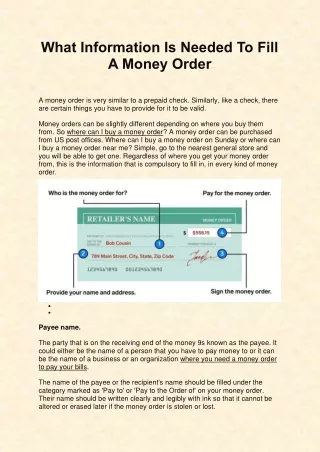
Checks on MOs for booking • Counter PA to see that:- • Proper Form used (MO-8) • Filled in ink or ball point pen • Amount in words and figures without correction • Amount within the limit • Name and address clear and complete • Signature of remitter or agent with date • Name and address in ackt portion • Not payable to fictitious or indefinite address • Not payable to more than one person and • not addressed to c/o postbox
Practice • Exercise 2.11.1
Booking MO in Point of sale • Booking transaction form is accessed through the menu as shown in figure below
Official entries on MO form • Made after booking of MO • Done in red ink; Following particulars are entered • M O Number • Date • Amount – in words and figures • PA’s Signature • Supervisor’s Signature • For HVMOs – • Indicate “HVMO” on the top • M O Number and date on the top • Name stamp • MO No & Date of booking to be noted in Ackt portion also in all MOs • A bundle with ordinary MOs to be handed over to despatch module operator • HVMOs to be separately handed over to despatch module operator for generation of HVMO list
MO issue list • On close of the counter, Point of sale PA settles the account with treasurer and performs shift end • After shift end, he/she can print reports • List of MOs issued is generated using the menu ‘Reports – Detailed’


![International Financial System (IFS) Money Order [ Electronic International Money Order- eIMO ]](https://cdn1.slideserve.com/1576592/slide1-dt.jpg)