Download
1 / 13
130 likes | 232 Vues
Simplify time entry and attendance management with our integrated system. Employees can easily log hours, request time off, and submit timesheets using various entry methods, including web and biometric data. Managers benefit from powerful approval workflows, detailed reporting, and real-time insights into employee attendance and trends. Configure timesheet formats, manage time off requests, and access historical data effortlessly, ensuring compliance and accurate payroll processing at every level.

E N D
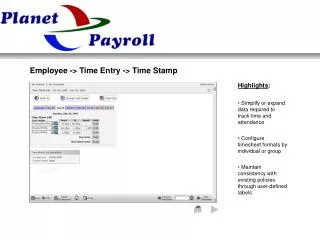
Employee -> Time Entry -> Time Stamp • Highlights: • Simplify or expand data required to track time and attendance • Configure timesheet formats by individual or group • Maintain consistency with existing policies through user-defined labels
Employee -> Time Entry -> Bulk Hours • Highlights: • Automatically pre-populate timesheets • Quickly enter comments or reason codes by exception • Easily view calculated hours if access is granted
Employee -> Time Entry -> Start / Stop • Highlights: • Track work time against departments, projects, tasks, etc. • View additional information such as planned Time Off • Manual or automatic submission of timesheets
Employee -> Time Entry -> Crossing Midnight • Highlights: • Web, barcode, Biometric and wireless data entry available • Streamlined workflow ensures accurate payroll • Easy to configure settings address the most complex pay rules
Employee -> Request Time Off • Highlights: • Enter Time Off directly into timesheet or require manager approval • Easily view authorized, taken and scheduled Time Off • Avoids schedule conflicts and unbiased enforcement of company policy
Manager -> Timesheet Approval • Highlights: • Easily review, edit and approve timesheets by exception • Quickly identify missing punches, attendance infractions and overtime • Identify employee trends including adherence to schedule
Manager -> Time Off Request Approval • Highlights: • Instant access to past Time Off and time scheduled in the future • System maintains all history of comments for approval and rejects • Automatic accrual processing notifies of potential negative balances
Manager -> Reports -> Seniority • Highlights: • Quickly filter, sort or group report data • Send data to screen, CSV, Excel, .PDF, .HTML, .XML • Data displayed in text, graphical and calendar formats
Manager -> Reports -> Detailed Hours • Highlights: • Drill-down capability directly from report allows quick change to data • Limit, expand and place data fields in preferred order • Easily push saved report settings to individuals or groups to save time
Manager -> Reports -> Time Off Calendar • Highlights: • Graphical view is familiar to all employees • Employee view based on security settings and group permissions • Available comments record approval history and prior communication
Manager -> Reports -> Dot Board • Highlights: • Know who’s working and who’s not in remote locations • Monitor what current projects employees are working on • Identify the last in or out punch by employee
Manager -> Schedules -> Daily View • Highlights: • Establish skills, positions and locations by business unit • Assign skills and work preferences to employees • Define rules (lowest $, fewest people, etc.) and generate schedules
Manager -> Notification -> Timesheet Submittal • Highlights: • System tracks most processes and core functions for exceptions • Configurable ‘tags’ send employee or process specific information • Notifications sent automatically based on specific occurrences or events