Understanding Bits, Bytes, and Computer Components: A Comprehensive Overview
This document serves as a roadmap to basic terminology and essential components of computers. It covers foundational concepts like bits and bytes, which form the smallest units of information, along with storage types such as KB, MB, GB, and TB. The discussion extends to major computer components including the power supply unit (PSU), hard drives (HDD), motherboards (MOBO), CPUs, and RAM. Additionally, the text briefly addresses various operating systems and their importance in computer functionality. Suitable for those seeking to understand the basics of computer architecture and operation.

Understanding Bits, Bytes, and Computer Components: A Comprehensive Overview
E N D
Presentation Transcript
Bits and Bytes WeeSan Lee weesan@cs.ucr.edu
Roadmap • Basic Terminology • Computer Components • Operating Systems • Conclusion • References
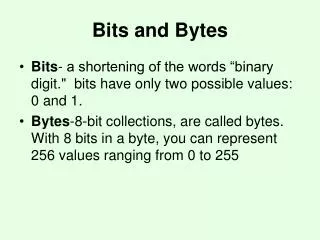
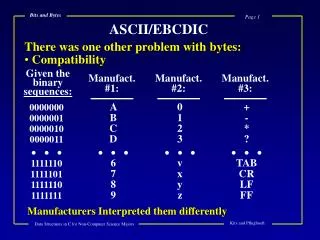
8 8 4 4 2 2 1 1 Basic Terminology • Bits • The smallest unit of information in a computer • 0 or 1 • Bytes • 8 bits • Eg. 0100 10102 = 4A16 = 74 = ‘J’ 0100 1010 = 4A A 4
Basic Terminology (cont) • KB • Kilo Bytes • Eg. 1 KB = 1,024 Bytes ≈ 1,000 Bytes • MB • Mega Bytes • Eg. 1 MB = 1,048,576 ≈ 1,000,000 Bytes • GB • Giga Bytes • Eg. 1 GB = 1,073,741,824 ≈ 1,000,000,000 Bytes • TB • Tera Bytes • Eg. 1 TB = 1000 GB
Computer Floppy Drive Optical Drive Hard Drive http://en.wikipedia.org/wiki/Image:Stripped-computer-case.JPG http://en.wikipedia.org/wiki/Power_supply_unit
Computer (cont) • PSU (Power Supply Unit) • Power up the computer • HDD (Hard Disk Drive) • A mass-storage for the computer • Size: 3.5” for desktop, 2.5” for laptop • Speed: 5400/7200 RPM • Type: ATA100/133 vs. SATA • Capacity: 8/17/32/60/80/120/160/250/500GB • 500GB = ½TB
Computer (cont) • FDD (Floppy Disk Drive) • Format: 5¼ ” or 3.5” • Capacity: 1.2M or 1.4M • Optical Drive • CDROM/CD-RW for CD • DVDROM/DVD-RW for DVD
Computer (cont) • Motherboard (MOBO) • Primary circuit board of the computer • Form factor: ATX/MicroATX/SFF • Newest form factor: HumpATX? • http://www.cs.ucr.edu/~weesan/hacks/hump_atx.html
Computer (cont) Floppy Disk Controller IDE Controller SATA Controller Power Connector CPU socket Back plane I/O
Computer (cont) • CPU (Central Processing Unit or processor) • The brain of the computer • Performs computation, data processing, etc http://www.intel.com/products/i/products/pentium4.jpg http://www.global-b2b-network.com/direct/dbimage/50086366/CPU_Cooler.jpg
Computer (cont) • Brand • Intel • 286/386/486, Pentium III/4, Xeon, Dual-Core, Core 2 Solo/Duo • AMD • K6/2, K7, Sempron, Athlon, Opteron • Clock speed • 66/100/200/300/450/600/800MHz • 1.2/1.4/1.6/1.83/2.0/3.0/3.2GHz • Overclocking • Forces a CPU to run faster than it was designed for
Computer (cont) • RAM (Random Access Memory) • A place that a program and data are kept so that they are accessible by the CPU • Types: SDRAM/DDR/DDR2/SO-DIMM • Name • DDR-200/266/333/400 • DDR2-400/533/667/800 • Capacity • 32/64/128/256/512MB • 1/2/4GB
Computer (cont) • Expansion slots • A place that expansion cards can be inserted to increase the functionality of the computer • Eg. Modem card, audio card, video card, Ethernet card, etc. • Type • ISA • PCI • AGP • PCI Express
Computer (cont) • Back panel I/O Ethernet Port Firewire Port Mouse Printer Port Audio ports VGA port USB port Keyboard Serial Port
Operating Systems • The software between the HW and apps • Eg. • Windows 95/98/2000/NT/ME/XP/Vista • Mac OS X (10.3/10.4) • Linux Distribution: Slackware/Redhat/Suse/Debian/Ubuntu/CentOS
Conclusion • Bits & Bytes • Computer • PSU • MOBO • CPU • RAM • HDD/FDD/Optical Drive
References • Internet Effectively (Ch 1-2) • http://computer.howstuffworks.com/pc.htm • ~ 3 mins of video • Motherboard • http://en.wikipedia.org/wiki/Image:ASRock_K7VT4A_Pro_Mainboard_Labeled_English.png
Homework • Read RFC2555 • ftp://ftp.rfc-editor.org/in-notes/rfc2555.txt • List all the names of the people appeared in the RFC • Submit the list via Moodle by next Wed (Oct 3) @ 23:55pm
Lab 1 • Get your CS username and password • Get familiar with Moodle • Update your profile • Post a message to the forum • Submit HW1 • Create a screendump • Form a team • 4-5 members • Pick a cool team name • Pick a team leader • Post your team info. to the “Form a Team” forum