Download
1 / 8
0 likes | 0 Vues
Best CPU kaise kharide? Is complete guide mein jaaniye Intel vs AMD comparison, cores, threads, budget tips aur gaming & editing ke liye best processor ka selection.

E N D
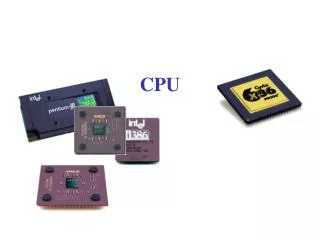
How to Buy Best CPU (Processor): Complete Buying Guide Introduction Aaj ke digital zamane mein computer sirf ek machine nahi raha, balki hamari daily life ka ek important hissa ban chuka hai. Chahe aap student ho, office work karte ho, gaming pasand karte ho, ya video editing, programming jaise heavy tasks karte ho – har situation mein CPU (Central Processing Unit) computer ka sabse important part hota hai. CPU ko computer ka brain bhi kaha jata hai, kyunki saari processing yahi karta hai. Is article mein hum detail mein samjhenge best CPU kaise kharidein, kaunse factors par dhyan dena chahiye, Intel vs AMD comparison, budget ke according best processors, aur common mistakes jo log CPU buy karte waqt kar dete hain. Yeh guide beginners aur advanced users dono ke liye helpful hogi. CPU Kya Hota Hai? CPU (Central Processing Unit) computer ka core component hota hai jo instructions ko process karta hai. Jab bhi aap koi software open karte ho, game khelte ho, ya internet use karte ho, CPU background mein saare calculations karta hai. Simple words mein: Fast CPU = Fast Computer Weak CPU = Slow Performance Isliye CPU choose karna ek bahut important decision hota hai.
CPU Buy Karne Se Pehle Important Factors 1. Apna Use Case Samjhein Sabse pehle yeh decide karein ki aap CPU kis purpose ke liye kharid rahe ho: Basic Use: Internet browsing, MS Office, online classes Students: Assignments, coding basics, presentations Gaming: High FPS, smooth gameplay Content Creation: Video editing, graphic designing, 3D rendering Professional Work: Programming, AI, data analysis Har use ke liye alag type ka CPU suitable hota hai.
2. Intel vs AMD – Kaunsa Better Hai? CPU market mein do major brands hain: Intel aur AMD. Intel Processors Advantages: • Strong single-core performance • Gaming ke liye achha option • Stable aur reliable Popular Series: • Intel Core i3 (Basic) • Intel Core i5 (Mid-range) • Intel Core i7 (High performance) • Intel Core i9 (Extreme performance) AMD Processors Advantages: • Better multi-core performance • Price-to-performance ratio achha • Content creators ke liye best Popular Series: • Ryzen 3 • Ryzen 5 • Ryzen 7 • Ryzen 9 Conclusion: Gaming ke liye Intel thoda better ho sakta hai, lekin multitasking aur productivity ke liye AMD Ryzen processors kaafi popular hain.
3. Cores aur Threads Cores: CPU ke andar chhote processors Threads: Ek core kitne tasks handle kar sakta hai Examples: • Dual Core (2 cores) • Quad Core (4 cores) • Hexa Core (6 cores) • Octa Core (8 cores) Recommendation: • Basic use: 4 cores • Gaming: 6 cores • Editing & professional work: 8 cores ya zyada • Zyada cores = better multitasking. • 4. Clock Speed (GHz) Clock speed batata hai CPU kitni speed se kaam karega. • 3.0 GHz = Normal performance • 4.0 GHz = High performance Lekin sirf GHz dekhkar CPU judge mat karein. Cores, architecture aur generation bhi equally important hote hain. • 5. Generation aur Architecture Hamesha latest generation CPU lene ki koshish karein. Example: • Intel 10th, 11th, 12th, 13th Gen • AMD Ryzen 3000, 5000, 7000 series New generation CPUs: • Zyada power efficient hote hain • Better performance dete hain • Future-proof hote hain
6. Integrated Graphics vs Dedicated GPU Kuch CPUs ke saath integrated graphics aati hai: • Intel UHD / Iris Xe • AMD Radeon Graphics Agar aap: • Casual gaming • Office work • Video playback karte ho, to integrated graphics kaafi hai. Heavy gaming ya editing ke liye dedicated graphic card zaroori hota hai. 7. Budget Planning Budget ke hisaab se CPU choose karna bahut zaroori hai. Low Budget (Entry Level) • Intel Core i3 • AMD Ryzen 3 Mid Range Budget • Intel Core i5 • AMD Ryzen 5 High End Budget • Intel Core i7 / i9 • AMD Ryzen 7 / Ryzen 9 Hamesha apne budget ke saath motherboard, RAM aur GPU compatibility bhi dekhein.
Gaming Ke Liye Best CPU Kaise Choose Karein? Gaming ke liye CPU ka role bahut important hota hai: • High clock speed • Strong single-core performance • Latest generation Recommended: • Intel Core i5 / i7 (Latest Gen) • AMD Ryzen 5 / Ryzen 7 • Sirf CPU hi nahi, GPU ke saath balance banana bhi zaroori hai. Content Creation & Editing Ke Liye CPU Video editing, rendering aur graphic design ke liye: • Zyada cores aur threads • Strong multi-core performance Best Options: • AMD Ryzen 7 / Ryzen 9 • Intel Core i7 / i9 Is type ke work mein RAM aur storage bhi equally important hote hain.
Laptop CPU vs Desktop CPU Laptop CPUs: • Power efficient • Low heat generation • Limited upgrade options Desktop CPUs: • Zyada powerful • Better cooling • Easy upgrade Agar portability chahiye to laptop, aur performance chahiye to desktop best choice hai. Common Mistakes CPU Buy Karte Time Sirf GHz dekhkar CPU lena Old generation processor buy karna Motherboard compatibility ignore karna Future upgrade ke baare mein na sochna Cheap power supply ke saath high-end CPU use karna In mistakes se bachkar aap apna paisa aur time dono save kar sakte ho. Future Proof CPU Kaise Choose Karein? • Latest generation processor • At least 6–8 cores • DDR4/DDR5 support • New socket motherboard Future-proof CPU aapko 4–5 saal tak smooth performance deta hai.
Conclusion Best CPU kharidna koi mushkil kaam nahi hai, bas aapko apni requirement clearly samajhni hoti hai. Har user ke liye best CPU alag hota hai – koi gaming ke liye, koi office work ke liye, aur koi professional editing ke liye. Is article mein humne detail mein discuss kiya: • CPU kya hota hai • Intel vs AMD comparison • CPU buying factors • Budget aur use-case based selection Agar aap in sab points ko follow karte ho, to aap easily best CPU choose kar sakte ho jo aapke kaam ko fast, smooth aur future-ready banayega. Tip: CPU buy karne se pehle hamesha reviews, benchmarks aur compatibility check karna na bhoolein.