

SlideServe
Menu
Préférences
© SlideServe · v2026

ARIES Example

JasminFlorian avatar
30 diapositives · 1.8K Views · Nov 15, 2011

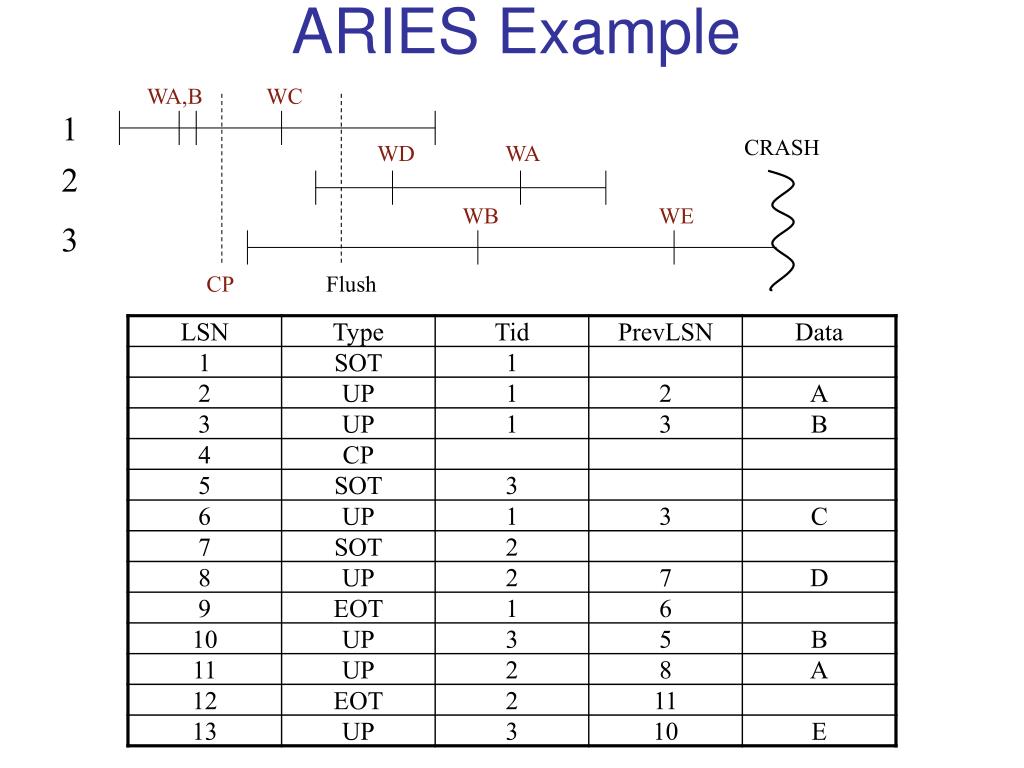
WA,B. WC. 1. CRASH. WD. WA. 2. WB. WE. 3. CP. Flush. ARIES Example. ARIES - What is Logged. “Physiological Logging” REDO Records Updates to data pages and index pages are logged separately But may use operational logging (e.g., INCREMENT/DECREMENT)
ARIES Example - slide 1
01 / 30ARIES Example
1 / 17

Télécharger la présentation

ARIES Example
Une image / un lien ci-dessous est fourni (tel quel) pour télécharger la présentation

Politique de téléchargement : le contenu du site vous est fourni TEL QUEL pour votre information et votre usage personnel ; il ne peut être vendu, concédé sous licence ni partagé sur d’autres sites sans l’accord de son auteur.Le contenu vous est fourni TEL QUEL, pour votre information et votre usage personnel uniquement. Téléchargez la présentation en cliquant sur ce lien. Lors du téléchargement, si vous ne parvenez pas à télécharger une présentation, l’éditeur a peut-être supprimé le fichier de son serveur.Pendant le téléchargement, si vous ne parvenez pas à obtenir une présentation, le fichier a peut-être été supprimé par l’éditeur.

F I N

Plus de contenu associé

Transcription de la présentation
  1. WA,B WC 1 CRASH WD WA 2 WB WE 3 CP Flush ARIES Example

  2. ARIES - What is Logged • “Physiological Logging” • REDO Records • Updates to data pages and index pages are logged separately • But may use operational logging (e.g., INCREMENT/DECREMENT) • Because escrow locks allow multiple writers • UNDO Records are Purely Logical • Only one record for index and data pages • May use operational logging

  3. WA,B WC 1 CRASH WD WA 2 WB WE 3 CP Flush ARIES Data Structures xactionTable dirtyPgTable Checkpoint Disk

  4. Crash Recovery • 3 Phases • Analysis • Rebuild data structures • Determine winners & losers • Redo • “Repeat history” • Why? • Undo • Undo Losers

  5. Analysis

  6. Analysis Disk xactionTable dirtyPgTable

  7. Analysis Disk xactionTable dirtyPgTable

  8. Analysis Disk xactionTable dirtyPgTable

  9. Analysis Disk xactionTable dirtyPgTable

  10. Analysis Disk xactionTable dirtyPgTable

  11. Not the same as just before crash (note disk state) Analysis dirtyPgTable Disk xactionTable Losers

  12. Redo dirtyPgTable • Where to begin? • Checkpoint? • Min(recLSN)! • What to REDO • Everything? • Slow • Problematic if using operational (escrow) logging • Redo an update UNLESS: 1. 2. 3. Disk

  13. Redo Example DirtyPgTable • Redo UNLESS • Page is not in dirtyPgTable • If LSN < recLSN • If LSN <= pageLSN Disk

  14. Redo Example DirtyPgTable • Redo UNLESS • Page is not in dirtyPgTable • If LSN < recLSN • If LSN <= pageLSN Disk

  15. Redo Example DirtyPgTable • Redo UNLESS • Page is not in dirtyPgTable • If LSN < recLSN • If LSN <= pageLSN Disk

  16. Redo Example DirtyPgTable • Redo UNLESS • Page is not in dirtyPgTable • If LSN < recLSN • If LSN <= pageLSN Disk

  17. Redo Example DirtyPgTable • Redo UNLESS • Page is not in dirtyPgTable • If LSN < recLSN • If LSN <= pageLSN Disk

  18. Redo Example DirtyPgTable • Redo UNLESS • Page is not in dirtyPgTable • If LSN < recLSN • If LSN <= pageLSN Disk

  19. Redo Example DirtyPgTable • Redo UNLESS • Page is not in dirtyPgTable • If LSN < recLSN • If LSN <= pageLSN Disk State identical to pre-crash state

  20. Undo • Walk backwards, following prevLSNs to UNDO losers xactionTable

  21. Undo • Walk backwards, following prevLSNs to UNDO losers xactionTable

  22. Undo • Walk backwards, following prevLSNs to UNDO losers xactionTable • Why can we just blindly apply UNDOs?

  23. UNDO Wrinkles • Logical UNDO • Why? • “Compensation Log Records” -- CLRs • Avoid repeating UNDO work • Why?

  24. UNDO with CLR Losers: 3

  25. UNDO with CLR

  26. UNDO with CLR

  27. UNDO with CLR

  28. UNDO with CLR

  29. UNDO with CLR

  30. REDO with CLR • REDO CLRs on crash recovery • Use REDO rules to check if updates in CLRs have already been done • After processing CLR, update lastLSN field in dirtyPgTable to point to prevLSN of CLR • Allows UNDO to start from the right place