How Do You Select the Best Responsive WordPress Theme for E-Commerce _
This PDF provides a comprehensive guide on selecting the best responsive WordPress theme for e-commerce. It covers key factors such as design, speed, customization, SEO, and mobile-friendliness. Readers will gain insights into making informed choices to enhance their online storeu2019s performance and user experience.


How Do You Select the Best Responsive WordPress Theme for E-Commerce _
E N D
Presentation Transcript
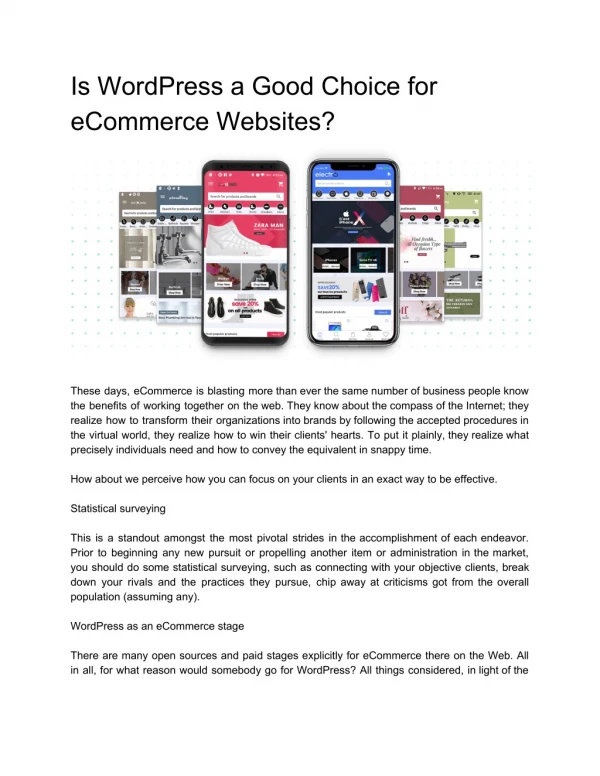
How Do You Select the Best Responsive WordPress Theme for E-Commerce? Introduction In today’s fast-paced digital marketplace, having an online store is more than just a luxury it is a necessity. With the rise of mobile shopping, ensuring your e-commerce website adapts seamlessly to various devices is critical. This is where choosing the rightWordPress responsive theme becomes essential. A responsive theme automatically adjusts the layout to fit screens of all sizes, ensuring a smooth browsing experience for desktop, tablet, and smartphone users alike. But with thousands of themes available, how do you select the best one for your e-commerce store? The right theme goes beyond aesthetics. It affects performance, user experience, and even search engine rankings. This guide will walk you through the essential factors to consider when choosing the best responsive WordPress theme for your e-commerce website. 1. Understanding What Makes a WordPress Theme Responsive Before diving into the selection process, it is essential to understand what a responsive WordPress theme is. In simple terms, a responsive theme automatically adapts your website’s layout and content based on the device being used.
Why does this matter for e-commerce? ● Improved User Experience: Customers can seamlessly browse and shop across devices. ● Higher Conversion Rates: A smooth experience encourages visitors to complete purchases. ● SEO Benefits: Google prioritizes mobile-friendly websites in search rankings. ● Reduced Bounce Rates: Responsive designs prevent users from leaving due to poor navigation. When evaluating themes, prioritize those labeled as "responsive" or "mobile-friendly" and verify their performance on various devices. 2. Key Features to Look for in a Responsive E-Commerce Theme Not all responsive WordPress themes are created equal. When selecting one for your online store, pay attention to these critical features: a) Mobile Optimization Ensure the theme provides a seamless experience on mobile devices. Check for features like: ● Touch-friendly navigation ● Optimized images for fast-loading ● Mobile-friendly checkout process b) Compatibility with WooCommerce WooCommerce is the leading WordPress e-commerce plugin. Ensure the theme is fully compatible with WooCommerce to avoid technical glitches. Look for: ● Product page layouts ● Cart and checkout customization ● Seamless payment gateway integration c) Customization Options Every online store is unique. A flexible theme allows you to customize key elements like: ● Homepage layout ● Product displays ● Color schemes and typography
Choose themes that offer an intuitive page builder like Elementor or Gutenberg for easy customization. d) Speed and Performance Slow websites drive away potential customers. Ensure your theme is optimized for speed with: ● Lightweight coding ● Lazy loading for images ● Minimized CSS and JavaScript Use tools like Google PageSpeed Insights to evaluate performance. e) SEO-Friendly Design Your theme should follow best practices for search engine optimization (SEO), including: ● Schema markup for product listings ● Clean and crawlable code ● Custom meta tags and headings 3. Evaluating Design and User Experience The design of your e-commerce site directly influences customer trust and purchasing decisions. Consider these aspects when choosing a theme: ● Clear Navigation: Make it easy for users to find products through an intuitive menu. ● High-Quality Imagery: Ensure the theme supports large, sharp images without compromising load speed. ● Product Presentation: Look for customizable product grids, sliders, and quick-view options. ● Mobile Usability: Test the theme on different devices to ensure consistent experiences. Always prioritize usability over flashy designs. A clean, well-organized store will keep visitors engaged and lead to higher conversions. 4. Checking for Regular Updates and Support WordPress and WooCommerce are constantly evolving, so your theme must stay up-to-date to ensure security and functionality. When evaluating a theme, ask: ● Is the theme regularly updated? Check the update history and frequency. ● Is there customer support? Look for responsive support channels like email or live chat. ● Are there detailed documentation and tutorials? These resources can save you time troubleshooting.
A well-maintained theme ensures long-term stability and compatibility with the latest WordPress updates. 5. Testing Theme Performance Before Committing Before making a final decision, thoroughly test the theme. Many premium wordpress themes offer demos or trial periods. Here are steps to evaluate a theme: 1. Check Responsiveness: Open the demo on various devices (desktop, tablet, smartphone). 2. Analyze Speed: Use performance tools like GTmetrix or Pingdom to test load times. 3. Browse Functionality: Test critical areas like product pages, checkout processes, and search filters. Additionally, read reviews from other users to understand their experience with the theme’s performance and reliability. Comparison of Different Types of Responsive WordPress Themes for E-Commerce Multipurpose Themes vs. Specialized E-Commerce Themes ● Multipurpose Themes: ○ Suitable for various business types. ○ Offers extensive customization and layout options. ○ Ideal if you want a single theme for multiple purposes beyond e-commerce. ● Specialized E-Commerce Themes: ○ Tailored specifically for online stores. ○ Optimized for product showcases, checkout processes, and customer interactions. ○ Best choice if your sole focus is selling products effectively. Free vs. Premium Themes ● Free Themes: ○ Budget-friendly but often lack advanced features and support. ○ Suitable for startups or small businesses with basic needs. ● Premium Themes: ○ Offers advanced features, better support, and regular updates. ○ Ideal for established stores or businesses aiming for scalability and a professional look.
Practical Steps to Select the Best Responsive WordPress Theme 1. Identify Your Business Needs Consider the type of products you sell, your target audience, and any specific features you require. For instance, a clothing store may need an image gallery, while a digital product store may prioritize download management. 2. Evaluate Theme Demos Most themes provide live demos. Explore these demos on various devices to check responsiveness and usability. Pay attention to navigation, product display, and checkout processes. 3. Read User Reviews Check reviews and ratings on reputable theme marketplaces like ThemeForest or the WordPress Theme Directory. Focus on feedback regarding responsiveness, customer support, and performance. 4. Verify Plugin Compatibility Ensure the theme is compatible with key plugins like WooCommerce, SEO plugins, caching tools, and security extensions. This ensures your site’s functionality won’t be limited. 5. Consider Future Growth Choose a theme that can scale as your business grows. Look for options that allow additional features like multi-language support, advanced search filters, and membership functionalities. Common Mistakes to Avoid When Choosing a Theme 1. Prioritizing Appearance Over Functionality A visually appealing theme is important, but it should not compromise speed, responsiveness, or essential e-commerce features. 2. Ignoring Mobile Testing Always test the theme on various devices and browsers to ensure a consistent user experience.
3. Overloading with Features Avoid themes bloated with unnecessary features. Too many built-in functions can slow down your site and complicate management. 4. Skipping Support Options Ensure the theme offers reliable customer support and thorough documentation. This is crucial when you encounter technical challenges. Conclusion Choosing the best responsive WordPress theme for your e-commerce store is a critical step toward building a successful online business. A well-chosen theme enhances user experience, improves search rankings, and ensures a seamless shopping journey across all devices. When selecting a theme, prioritize features such as mobile optimization, WooCommerce compatibility, and performance speed. Evaluate themes thoroughly through testing and user reviews, and do not overlook the importance of ongoing support and updates. By investing time in selecting the right responsive WordPress theme, you set the foundation for a professional, user-friendly, and high-converting e-commerce website. Whether you are starting from scratch or upgrading an existing store, choosing the right WP Theme Bundle can elevate your online presence and help you achieve long-term success