Essential Guidelines for Using the Presentation Timeline Tool
Before you start with the Presentation Timeline tool, there are a few key points to remember. The next slide is your storyboard tool. Make a “save as” copy and delete the introductory slide. Estimate the number of slides needed and duplicate the Timeline slide accordingly. Each timeline slide includes five placeholders for slides. Create a print-ready linear timeline that can be easily shared. For questions or suggestions about future iterations of the tool, feel free to email Michael at radiatepresents.com.

Essential Guidelines for Using the Presentation Timeline Tool
E N D
Presentation Transcript
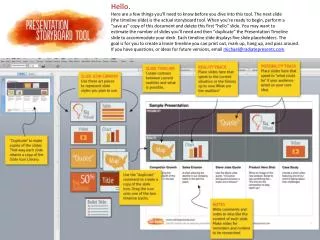
Hello. Here are a few things you’ll need to know before you dive into this tool. The next slide (the timeline slide) is the actual storyboard tool. When you’re ready to begin, perform a “save as” copy of this document and delete this first “hello” slide. You may want to estimate the number of slides you’ll need and then “duplicate” the Presentation Timeline slide to accommodate your deck. Each timeline slide displays five slide placeholders. Thegoal is for you to create a linear timeline you can print out, mark up, hang up, and pass around. If you have questions, or ideas for future versions, email michael@radiatepresents.com.
Presentation Timeline Competitor Growth Sales Erosion Steve Jobs Quote Product Hero Shot Case Study A map showing the explosive growth of the competition in the last five years. A chart showing the decline in our company sales in the last five years. Use the Steve Jobs quote: "Innovation distinguishes between a leader and a follower." Show an image of the new product. Script to say something like… “It’s time for the competition to play catch-up.” Include a short video featuring one of our client’s talking about their challenges.