Download
1 / 1
10 likes | 162 Vues
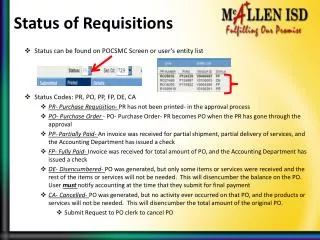
This guide outlines the different status codes for purchase requisitions and orders, including PR, PO, PP, FP, DE, and CA. It explains how to track the status on the POCSMC screen or the user's entity list. Learn what each code represents: from unprinted requisitions currently in approval (PR) to fully paid orders (FP) and cancelled orders (CA). This resource emphasizes the importance of notifying the accounting department at the time of final payment requests and provides guidance on submitting cancellation requests to the PO clerk.

E N D
Status of Requisitions • Status can be found on POCSMC Screen or user’s entity list • Status Codes: PR, PO, PP, FP, DE, CA • PR- Purchase Requisition- PR has not been printed- in the approval process • PO- Purchase Order - PO- Purchase Order- PR becomes PO when the PR has gone through the approval • PP- Partially Paid- An invoice was received for partial shipment, partial delivery of services, and the Accounting Department has issued a check • FP- Fully Paid- Invoice was received for total amount of PO, and the Accounting Department has issued a check • DE- Disencumbered- PO was generated, but only some items or services were received and the rest of the items or services will not be needed. This will disencumber the balance on the PO. User mustnotify accounting at the time that they submit for final payment • CA- Cancelled- PO was generated, but no activity ever occurred on that PO, and the products or services will not be needed. This will disencumber the total amount of the original PO. • Submit Request to PO clerk to cancel PO