Download
1 / 6
60 likes | 166 Vues
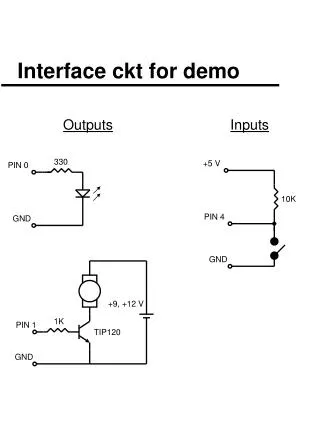
This interactive demo program showcases an electronic circuit interface designed for educational purposes. It includes functionalities to control LEDs, a motor, and sound output based on button inputs. The demo involves checking button states and managing LED colors through loops, timing delays, and sound playback. With pre-defined values and motor control commands, users can visualize microcontroller capabilities in a hands-on manner. Ideal for learning programming concepts and interfacing in electronics, the program offers a practical introduction to controls and outputs.

E N D
+9, +12 V 1K PIN 1 TIP120 GND +5 V 10K 330 PIN 0 PIN 4 GND GND Interface ckt for demo Outputs Inputs
DEMO PROGRAM '-------------------------------- ' demo.bas ' ' Stamp demo program 4-28-01 (wkd) '-------------------------------- start: b2 = 0 ' for button command b4 = 100 ' sound variables b5 = 80 top: high 0 ' red led on loop1: ' check switch if in4 = 1 then loop1
action: for b3 = 1 to 5 high 0 ' red led on low 1 ' green led off pause 500 ' wait 0.5 sec low 0 ' red led off high 1 ' green led on pause 500 next b3 low 0 ' both led's off low 1 pause 500
music: sound 2,(b4,20,b4,20,b4,20,b5,100) pause 250 for b3 = 0 to 127 step 10 sound 2,(25,10,b3,10) next b3 pause 500 motor: high 3 ' motor on pause 2000 ' wait 2 sec low 3 ' motor off pause 750 finish: sound 2,(120,75,50,75,120,150) goto top ' start all over again
N = 15 N = $0F N = %00001111 All these are the same Numbering conventions 100 ‘ decimal $64 ‘ hex %01100100 ‘ binary