
Uploaded by
cooper-davidson
5 SLIDES
185 VUES
50LIKES
Select this
DESCRIPTION
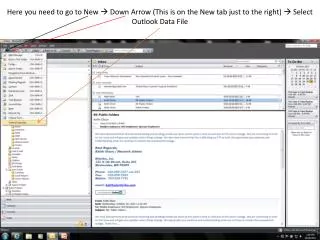
Here you need to go to New Down Arrow (This is on the New tab just to the right) Select Outlook Data File. Select this. Click Ok. My Personal Folder. Name of PST. Click Ok. Default Name (Before). Name After.
Download
1 / 5
Télécharger la présentation 
Select this
An Image/Link below is provided (as is) to download presentation
Download Policy: Content on the Website is provided to you AS IS for your information and personal use and may not be sold / licensed / shared on other websites without getting consent from its author.
Content is provided to you AS IS for your information and personal use only.
Download presentation by click this link.
While downloading, if for some reason you are not able to download a presentation, the publisher may have deleted the file from their server.
During download, if you can't get a presentation, the file might be deleted by the publisher.
E N D
Presentation Transcript
Here you need to go to New Down Arrow (This is on the New tab just to the right) Select Outlook Data File
Select this Click Ok
My Personal Folder Name of PST Click Ok
Default Name (Before) Name After
As you can see now I have created myself a Personal Folder that I can create Folders within it and Move emails from my Inbox to this new Save. Takes Stress off of Exchange Server and Relieves Space for it as well. This is proper Inbox Cleanup







![Power Point of this presentation: [website] ndcel Select: “State affiliates”](https://cdn3.slideserve.com/5509943/slide1-dt.jpg)


More Related