How to Set Up DHCP on Windows 2000 or XP: A Step-by-Step Guide
20 likes | 161 Vues
This guide provides a detailed walkthrough on how to configure DHCP settings on Windows 2000 or XP. Begin by accessing your network properties through My Network Places. You can use either the right-click method or the system tray icon. Next, navigate to the Internet Protocol TCP/IP settings in your Local Area Connection properties. Follow these steps to enable automatic IP address assignment. Remember that while DHCP will provide your IP address, gateway, subnet mask, and DNS servers, proxy servers must be configured manually in your web browsers.


How to Set Up DHCP on Windows 2000 or XP: A Step-by-Step Guide
E N D
Presentation Transcript
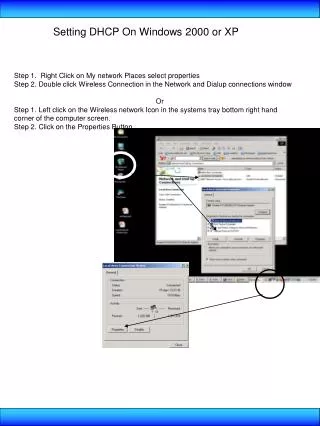
Setting DHCP On Windows 2000 or XP Step 1. Right Click on My network Places select properties Step 2. Double click Wireless Connection in the Network and Dialup connections window Or Step 1. Left click on the Wireless network Icon in the systems tray bottom right hand corner of the computer screen. Step 2. Click on the Properties Button
Setting DHCP On Windows 2000 or XP • Step 3. Click on Internet Protocol TCP/IP in the Local Are Connections Property Window • Step4. Click on Obtain IP address Automatically and Press OK • The following Parameters will be provided for you: • IP address • Gateway • Subnet Mask • DNS servers • Wins Servers • Proxy Servers are still required to be entered manually in the web browsers