BTU Test Program Installation and Daily Use Guide
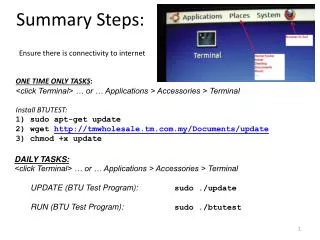
This guide provides step-by-step instructions for installing the BTU Test Program and running daily tasks. Ensure you have internet connectivity before proceeding. For the initial setup, open the Terminal and execute the commands to update and download the installation file. After installation, run the program daily to ensure optimal performance. Follow the commands provided for both installation and execution of the program. Remember, these steps are to be completed in the Terminal for effective results.

BTU Test Program Installation and Daily Use Guide
E N D
Presentation Transcript
Summary Steps: Ensure there is connectivity to internet ONE TIME ONLY TASKS: <click Terminal> … or … Applications > Accessories > Terminal Install BTUTEST: 1) sudoapt-get update 2) wgethttp://tmwholesale.tm.com.my/Documents/update 3) chmod+x update • DAILY TASKS: • <click Terminal> … or … Applications > Accessories > Terminal • UPDATE (BTU Test Program): sudo ./update • RUN (BTU Test Program):sudo ./btutest