Managing Multicast Fragmentation in Windows Media Services: Optimization and Troubleshooting
This document discusses strategies to manage multicast fragmentation in Windows Media Services (WMS) environments, particularly focusing on encoder workstations and origin servers. It highlights how to optimize fragment transmission by adjusting packet sizes and modifying server configurations in the ServerNameSpace.xml file. The guide also addresses potential sources of fragmentation issues, such as network components like cards, switches, and proxies, and provides references for further reading on reducing broadcast delay and overall performance optimization of media services.

Managing Multicast Fragmentation in Windows Media Services: Optimization and Troubleshooting
E N D
Presentation Transcript
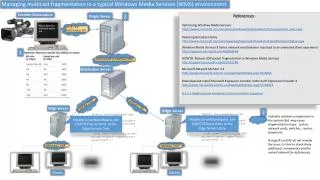
Managing multicast fragmentation in a typical Windows Media Services (WMS) environment Encoder Workstation 2 References OriginServer Optimizing Windows Media Serviceshttp://www.microsoft.com/windows/windowsmedia/howto/articles/optimize_web.aspxReducing Broadcast Delayhttp://www.microsoft.com/windows/windowsmedia/howto/articles/BroadcastDelay.aspx Adjust optimum maximum packet size HTTP / TCP RTSP/ UDP or TCP Windows Media Services 9 Series network send behavior may lead to an unwanted client experiencehttp://support.microsoft.com/kb/828566 1 HOWTO: Reduce UDP packet fragmentation in Windows Media Serviceshttp://support.microsoft.com/kb/951269 Unicast/UDP or Multicast/UDP Distribution Server Microsoft Network Monitor 3.4http://www.microsoft.com/en-us/download/details.aspx?id=4865 Download and Install Microsoft Expression Encoder 4 Microsoft Expression Encoder 4http://www.microsoft.com/en-us/download/details.aspx?id=18974 8.2.4.1 Media Stream Broadcast Protocol General Sequence UniCast/ TCP UniCast/ TCP Edge Server Edge Server 3 Modify ServerNameSpace.xml <node name="UDPBurstLimitMs" opcode="create" type="int32" value="0x0" /> <node name="TCPBurstLimitMs" opcode="create" type="int32" value="0x0" /> Modify ServerNameSpace.xml <node name="UDPBurstLimitMs" opcode="create" type="int32" value="0x0" /> <node name="TCPBurstLimitMs" opcode="create" type="int32" value="0x0" /> Indicates unknown components in the system that may cause fragmentation issues, such as network cards, switches , routers , proxies etc. If steps #1 and #2 do not remedy the issue, its time to check these additional components and the overall network for deficiencies. Modify ServerNameSpace .xml UDP/TCP burst limits at the Edge Servers Only Modify ServerNameSpace .xml UDP/TCP burst limits at the Edge Servers Only Multicast / UDP Multicast /UDP Clients Clients