
Comprehensive Guide to Editing, Assembling, Linking, and Debugging JNM Files
This guide provides an in-depth overview of the processes involved in editing, assembling, linking, and debugging JNM files. It details the various file types created during the assembly and linking process, such as source (.asm), object (.obj), listing (.lst), program database (.pdf), and map files (.map). You'll also learn about essential tools like EDIT, Notepad, MASM, and TASM assemblers, as well as debugging tools including Debug and Codeview. The guide includes step-by-step instructions to ensure efficient coding and project management.

Comprehensive Guide to Editing, Assembling, Linking, and Debugging JNM Files
E N D
Presentation Transcript
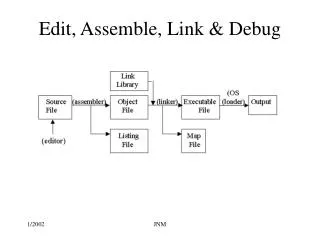
Files Created JNM
Files Created (Verbose) • Source File (.asm) – an ASCII file • Object File (.obj) – a machine-translation of the program • Listing File (.lst) – a copy of the program’s source code, suitable for printing, with line numbers, offset addresses, translated machine code, and a symbol table. JNM
Files Created (Verbose – cont) • Program Database File (.pdf) – updated during the link step if –Zi option is used with ML. JNM
Files Created (Verbose –cont) • Map File (.map) – a text file containing information about the segments contacined in a program being linked. - EXE module name • timestamp from the program file header • List of segment groups in the program – with each group’s start address, length, group name, and class. • List of public symbols, with each address, symbol name, flat address and module where defined. • Address of the program’s entry point. JNM
Editors • EDIT – available with DOS • Notepad – Text editor • PWB Editor– Programmer’s Workbench • MASM’s management tools for assembly code • PFE – Used in lab • Ultraedit, etc… - available free on internet JNM
Assemblers • MASM – Microsoft Assembler • TASM – Borland’s Turbo Assembler JNM
Debuggers • Debug • Debug32 – Included with Uffenbeck book • Codeview – symbolic debugger (source code can be viewed while debugging) JNM
Codeview Screen JNM
Codeview Windows • Source Window • Use options button to toggle between options • Memory Window • Can change size to increase amount of memory seen • Register Window • Command Window • Output Window(F4) – full screen • Debugging – • F8 – trace – T - (with procedures) • F10 – step - P - (without procedures) • Breakpoints(Data – Set Breakpoint – Break at Location) JNM
Source Code Template Source Code Template JNM
How Do you Assemble your Code • Assuming you have created a source file using an editor, you must now assemble it. • You could type in • MASM /z/zi filename • LINK /co filename • MASM contains ML executable program • ML /Zi /Zm /Fm /Fl filename.asm /link /co c:\irvine\irvine JNM
Better Ways to Assemble and Link Files • Run make16.bat (or make32.bat) • Run make16 from the directory where your source file is located • Set path to find masm615 • C:>path = c:\masm615 • C:>make16 filename • C:> cv filename JNM