Understanding Control Flow: If, Else, and Switch Statements in Java
This guide provides a comprehensive overview of control flow statements in Java, including the if, if-else, nested if, and switch statements. Learn how to utilize boolean expressions to direct program execution based on conditions. With practical examples, such as evaluating test scores and providing user feedback based on conditions, this resource will help deepen your understanding of flow control in Java programming. You'll also discover best practices for structuring your code with proper indentation and the use of braces.

Understanding Control Flow: If, Else, and Switch Statements in Java
E N D
Presentation Transcript
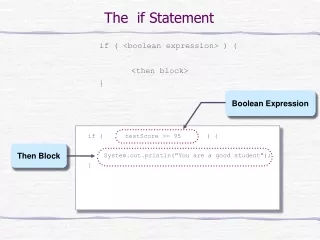
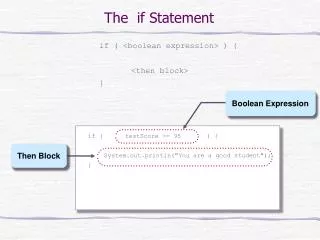
Boolean Expression Then Block The if Statement if ( <boolean expression> ) { <then block> } if ( testScore >= 95 ) { System.out.println("You are a good student"); }
true testScore >= 95? System.out.println ("You are a good student"); false Control Flow of if • Praff … out to reality … If.java
if (testScore < 50) { System.out.println("You did not pass"); } else { System.out.println("You did pass"); } Boolean Expression Then Block Else Block The if-else statement if ( <boolean expression> ) { <then block> } else { <else block> }
true false testScore < 50 ? System.out.println ("You did pass"); System.out.println ("You did not pass"); Control Flow • Aaaieeeeooo … out to reality … IfElse.java
The Nested-if Statement • The then and else block of an if statement can contain any valid statements, including other if statements. An if statement containing another if statement is called a nested-if statement. if (testScore >= 50) { if (studentAge < 10) { System.out.println("You did a great job"); } else { System.out.println("You did pass"); } } else { //test score < 50 System.out.println("You did not pass"); }
inner if true false testScore >= 50 ? false true studentAge < 10 ? System.out.println ("You did not pass"); System.out.println ("You did pass"); System.out.println ("You did a great job"); Control Flow of Nested-if Statement • Zzzzzzatong … out to reality … NestedIf.java
if (testScore < 70) { messageBox.show("You did not pass"); messageBox.show("Try harder next time"); } else { messageBox.show("You did pass"); messageBox.show("Keep up the good work"); } Compound Statements • You have to use braces if the <then> or <else> block has multiple statements. Then Block Else Block • Always always always uses {}s, even if it’s not required
if (x < y) { if (x < z) { System.out.println("Hello"); } else { System.out.println("Good bye"); } } if (x < y) if (x < z) System.out.println("Hello"); else System.out.println("Good bye"); Matching else really means
if (x < y) { if (x < z) { System.out.println("Hello"); } } else { System.out.println("Good bye"); } Matching else if (x < y) { if (x < z) System.out.println("Hello"); } else { System.out.println("Good bye"); } means Kleeeptong … out to reality … MatchingElse.java
if ( <boolean expression> ) { … } else { … } if ( <boolean expression> ) { … } else { … } Style Guide Style 1 Style 2 • Always always always indent the true and false blocks
if (score >= 85) { System.out.println(”Grade is A"); } else { if (score >= 75) { System.out.println(”Grade is B"); } else { if (score >= 65) { System.out.println(”Grade is C"); } else { if (score >= 50) { System.out.println(”Grade is D"); } else { System.out.println(”Grade is N"); } } } } if - else- if
if (score >= 85) { System.out.println(”Grade is A"); } else if (score >= 75) { System.out.println(”Grade is B"); } else if (score >= 65) { System.out.println(”Grade is C"); } else if (score >= 50) { System.out.println(”Grade is D"); } else { System.out.println(”Grade is N"); } if - else- if • Ooorgh … out to reality … IfElseIf.java
Multiple method returns • A method can have multiple return statements. • If statements are often used to control which is used. • Bing-bada-boom ... out to reality ... IfReturn.java
Arithmetic Expression switch ( fanSpeed ) { case 1: System.out.println("That's low"); break; case 2: System.out.println("That's medium"); break; case 3: System.out.println("That's high"); break; } Case Label Case Body The switch statement switch ( <arithmetic expression> ) { <case label 1> : <case body 1> … <case label n> : <case body n> }
true N == 1 ? x = 10; false break; true N == 2 ? switch ( N ) { case 1: x = 10; break; case 2: x = 20; break; case 3: x = 30; break; } x = 20; false break; true N == 3 ? x = 30; false break; switch With break Statements • Vrootytoot … out to reality … Switch.java
switch ( binaryDigit ) { case 0: System.out.println("zero"); break; case 1: System.out.println("one"); break; default: System.out.println("That's not a binary digit"); break; } The switch Statement with default switch ( <arithmetic expression> ) { <case label 1> : <case body 1> … <case label n> : <case body n> default: <default body> } • Nic … out to reality … SwitchDefault.java
true N == 1 ? x = 10; false switch ( N ) { case 1: x = 10; case 2: x = 20; case 3: x = 30; } true N == 2 ? x = 20; false true N == 3 ? x = 30; false switch With No break Statements • Lapa-lapa … out to reality … SwitchFall.java