Student and TES Punch Clock Instructions for Part-Time Employees
10 likes | 138 Vues
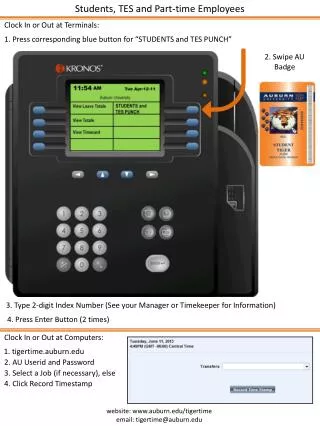
This guide provides essential steps for students and part-time employees at Auburn University to clock in or out using terminals and computers. To clock in/out at terminals, press the “STUDENTS and TES PUNCH” button, swipe your AU badge, enter your 2-digit index number (consult your Manager or Timekeeper if unsure), and press the Enter button twice. For computer clocking, visit tigertime.auburn.edu, log in with your AU User ID and password, select a job (if needed), and click to record your timestamp. For support, email tigertime@auburn.edu.


Student and TES Punch Clock Instructions for Part-Time Employees
E N D
Presentation Transcript
Students, TES and Part-time Employees Clock In or Out at Terminals: 1. Press corresponding blue button for “STUDENTS and TES PUNCH” 2. Swipe AU Badge 3. Type 2-digit Index Number (See your Manager or Timekeeper for Information) 4. Press Enter Button (2 times) Clock In or Out at Computers: 1. tigertime.auburn.edu 2. AU Userid and Password 3. Select a Job (if necessary), else 4. Click Record Timestamp website: www.auburn.edu/tigertime email: tigertime@auburn.edu