Instructions for Registering Your VOIP Phone System
Follow these simple steps to register your new VOIP phone. Start by connecting the network cables and picking up the handset. Dial “cbts” (2287) and select your language by pressing 1 for English. Enter your phone number in the format 1 + area code + 7-digit number. The system will prompt you to confirm the number. If registration fails, set the handset down and retry. For ongoing issues, please contact our trained VOIP staff for assistance. Note: Your new phone won’t receive calls until the number is ported.

Instructions for Registering Your VOIP Phone System
E N D
Presentation Transcript
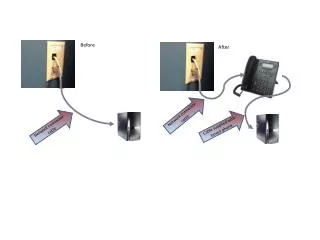
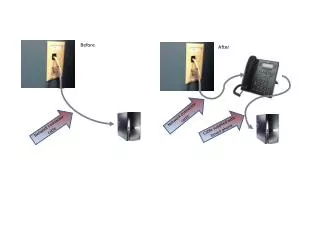
Before After Network connector cable Network connector cable Cable supplied with boxed phone
Pick up the phone handset and dial “cbts” (2287)…. • When prompted, press 1 for “English” • When prompted, dial your phone number as follows: • 1 + your area code + your 7-digit state phone number • 4. The system will ask you to re-enter the number • 5. The phone will reboot and your name should come up… • Registering your phone Problems registering the phone? – Set the handset down and try the instructions above once more. If the phone still does not register, please contact one of the trained VOIP staff so we can investigate the cause.
After Before Network connector cable Network connector cable Register your phone with your phone number (see next page for steps) Cable supplied with boxed phone You now have two working phones on your desk, but you won’t receive any calls on the new phone until the phone number is ported over (your CENTREX phone will stop working when the phone number is ported to the VOIP phone) See the VOIP Answer Place Topic (search on VOIP at http://ohioepa.custhelp.com) for instructions on how to get to these two web sites