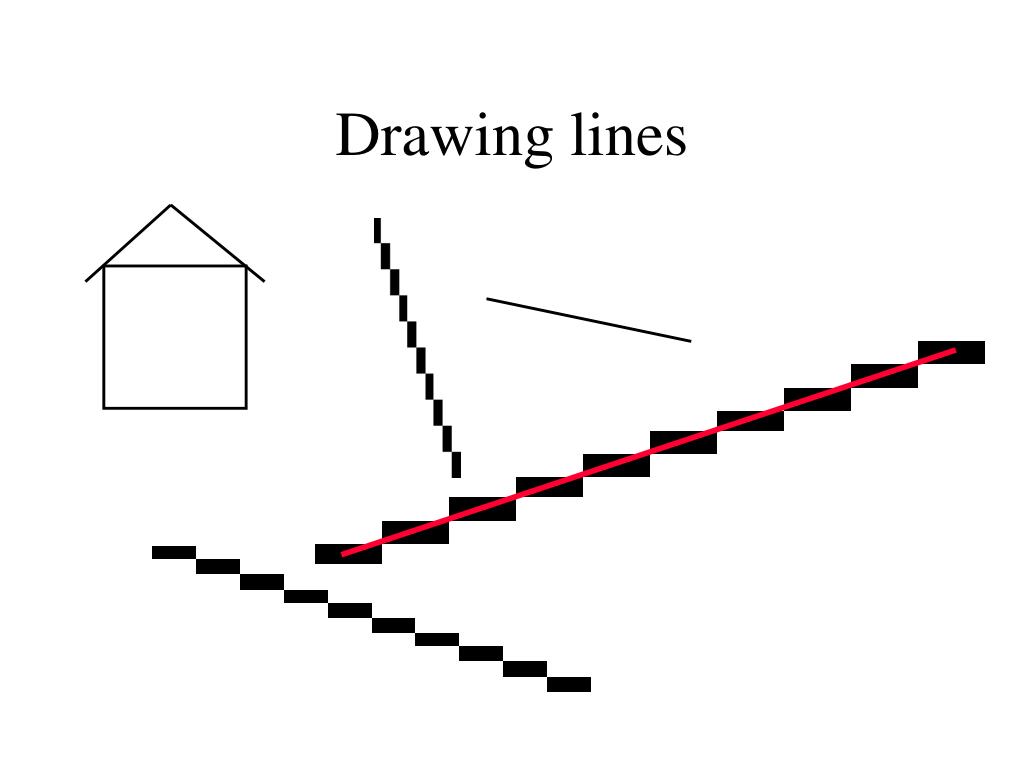
Drawing lines
Line algorithm 1: DDASimple, but uses floating point values Xdifference = (Xend-Xstart)Ydifference = (Yend-Ystart)y = Ystartdelta_Y = Ydifference / Xdifferenceloop x Xstart to Xend putpixel(x, y) y = y + delta_yend_of_loop x
Line algorithm 2Keep the fraction part of y in a separate variable, YerrorStart one half up. Xdifference = (Xend-Xstart)Ydifference = (Yend-Ystart)y = Ystartdelta_Y = Ydifference / XdifferenceYerror = 0.5loop x Xstart to Xend putpixel(x, y) Yerror = Yerror + delta_y if Yerror >= 1 then y = y + 1 Yerror = Yerror - 1 end_if end_of_loop x
Line algorithm 3, integer mathMultiply Yerror with 2*Xdifference Xdifference = (Xend-Xstart)Ydifference = (Yend-Ystart) y = YstartYerror = (0.5*2)*Xdifferenceloop x Xstart to Xend putpixel(x, y) Yerror = Yerror + 2*Ydifference if Yerror >= 2*Xdifference then y = y + 1 Yerror = Yerror - 2*Xdifference end_ifend_of_loop x
Line algorithm 4Subtract 2*Xdifference from Yerror Xdifference = (Xend-Xstart)Ydifference = (Yend-Ystart) y = YstartYerror = -Xdifferenceloop x Xstart to Xend putpixel(x, y) Yerror = Yerror + 2*Ydifference if Yerror >= 0 then y = y + 1 Yerror = Yerror - 2*Xdifference end_ifend_of_loop x
Line algorithm 5, BresenhamBrushing up things a little Xdifference = (Xend-Xstart)Ydifference = (Yend-Ystart)Yerror = 2*Ydifference - XdifferenceStepEast = 2*YdifferenceStepNorthEast = 2*Ydifference - 2*Xdifferenceplot_pixel(x, y)loop x Xstart to Xend if Yerror <= 0 then Yerror = Yerror + StepEast else y = y + 1 Yerror = Yerror + StepNorthEast end_if putpixel(x, y)end_of_loop x
Using symmetry (-y,x) (y,x) (-x,y) (x,y) (-x,-y) (x,-y) (-y,-x) (y,-x)
Filling polygons
Filling polygons Draw one scan-line at a time = scan conversion
Scan converting convex polygons Sort the edges, so we know which ones are left / right. Calculate left and right edge for each scanline (y-value) and fill between the left and the right edge values.
Sliver Be careful to only fill pixels inside the polygon, we do not want double edges. Standard is to include the low valued edges (left edge and first scan line) in the polygon. (Does not solve all problems.)
How to calculate the edge values? Bresenham? Requires integer endpoints => polygon jumps a pixel at a time when moving. (Solve using fixed point mathematics.) Here we will use the simpler DDA algorithm instead.
A ”pixel-perfect” scan conversion algorithm Start by splitting your polygon with horizontal lines at each intermediate vertex and calculate the positions of any new vertices. Each part is now a special case of a figure limited by two arbitrary sloped (not horizontal) lines and two horizontal lines. Note that the horizontal edges may have length zero.
Linear interpolation p(a) = (1- a)p1 +a p2 p2=(X2,Y2) y(x) = kx + m k = dy/dx= (Y2- Y1) / (X2- X1) m = Y1 p1=(X1,Y1) p1=(X1,Y1)
Flat top and bottom (X2R,Y2) (X2L,Y2) height: H=Y2-Y1 slope left/right: SL=(X2L-X1L)/H SR=(X2R-X1R)/H (X1L,Y1) (X1R,Y1)
Scan converting polygons xL=X1L xR=X1R y=ceil(Y1) ySkip=y-Y1 xL+=ySkip*SL xR+=ySkip*SR ySkip (X1L,Y1)
Scan converting polygons hline(xL,xR,y) while y floor(Y2) for x from ceil(xL) to floor(xR) putpixel(x,y); x+=1 end for y+=1 xL+=SL*1 xR+=SR*1 end while (X1L,Y1)
Interpolated scan conversion When I interpolate colour, I like to think of the colour value as just another dimension. So instead of drawing polygons in 2D, we draw them in 3D (or rather 5D) where the colour value is the z-dimension.
Bi-linear interpolation Linear interpolation in two directions. First we interpolate in the y-direction, then we interpolate in the x-direction. Unique solution for flat objects (triangles are always flat).
Interpolate the new variable over the polygon in just the same way as you did before using the colour slope: dc/dy. CSL=(C2L-C1L)/H CSR=(C2R-C1R)/H xL=X1L xR=X1R cL=C1L cR=C1R y=ceil(Y1) ySkip=y-Y1 xL+=ySkip*SL xR+=ySkip*SR cL+=ySkip*CSL cR+=ySkip*CSR ySkip (X1L,Y1,C1L)
We must interpolate horizontally also by adding dc/dx while y floor(Y2) dcdx=(cR-cL)/(xR-xL) xSkip=ceil(xL)-xL c=cL+xSkip*dcdx for x from ceil(xL) to floor(xR) putpixel(x,y,c); x+=1 c+=dcdx end for y+=1 xL+=SL*1 xR+=SR*1 cL+=CSL*1 cR+=CSR*1 end while xSkip hline(xL,xR,cL,cR,y)