Storing and Interpreting Bit Patterns in Integrated Circuits
This presentation by John Miner focuses on the automation of production lines using low-end microprocessors and integrated circuits for specific tasks, such as temperature and pressure control. Attendees will learn how to utilize the VARBINARY data type for storing memory buffers in tables. Key topics include storing version numbers, breaking bit patterns into registers, shifting bits, and combining values from multiple registers. The session aims to equip participants with practical skills for working with binary data in manufacturing environments.


Storing and Interpreting Bit Patterns in Integrated Circuits
E N D
Presentation Transcript
Working with bit patterns By John Miner
Integrated Circuits • In today’s manufacturing environment, production lines are automated with robotics and sensors. • Many of these low end microprocessors and/or integrated circuits are designed for specific tasks such as temperature and pressure control. • This presentation will review how to store the memory buffer in a table and use a view to interpret the results.
Covered Topics • Using the VARBINARY data type to store the bit pattern. • Storing a version number just in-case the decode changes. • Breaking the pattern into registers and nibbles. • Left shifting of the bits. • Right shifting of the bits. • Combining bits from two registers. • Putting it all together with a view.
Using VARBINARY field I defined a table with following attributes. • Serial Number as primary key. • Test Time for the part. • Version number of the I.C. • Register to store binary data. • Modified by to see who did it? • Modified date to see when done.
Break into smaller parts • Every 4 bytes is an integer • Most I.C. consider this a register • Every byte is a hex nibble • Decode the hex
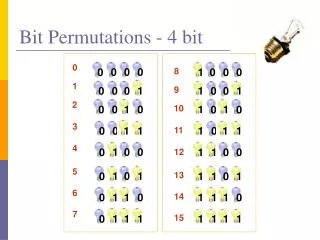
Review of Hexadecimal 0000 = 0 0001 = 1 0010 = 2 0011 = 3 0100 = 4 0101 = 5 0110 = 6 0111 = 7 1000 = 8 1001 = 9 1010 = A 1011 = B 1100 = C 1101 = D 1110 = E 1111 = F
AND, OR, Shift • AND – if both bits 1 then 1 else 0 • OR – if both bits 0, then 0 else 1 • LEFT SHIFT – multiple by 2 for each bit • RIGHT SHIFT – divide by 2 for each bit
Crafting The Solution • Current example has 2 registers • This is 16 bits • Decode into registers • Decode into fields • Use view to put it together
Biography • Has twenty years of data processing and proven project management experience, specializing in the banking, health care, and government areas. • His credentials include a Masters degree in Computer Science from the University of Rhode Island; and Microsoft Certificates (MCDBA & MCSA). • John is currently a Developing DBA at Sensata working with SQL Server 2008 silo of products. • When he is not busy working, he spends time with his wife, daughter and dog enjoying outdoor activities
Questions & Answers • References • SQL Server Books Online - http://msdn.microsoft.com/en-us/library/ms130214.aspx • Please ask about the presentation. • If you have any questions, you can contact me at j.miner@cox.net