Advanced Vertical Air Direction Control and Energy Saving Features for WH-H01EE
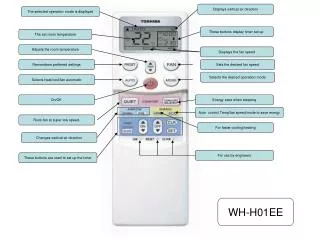
The WH-H01EE unit offers enhanced features for optimal room climate management. Displays such as operation mode, set room temperature, and fan speed ensure easy control and monitoring. Users can select from heat, cool, or automatic modes and adjust the fan speed as desired. The unit remembers preferred settings and utilizes energy-saving functions while sleeping. Additionally, it operates at a super low fan speed for efficient cooling and heating. Designed for engineer use, the user-friendly buttons allow for quick timer setup and air direction adjustments.

Advanced Vertical Air Direction Control and Energy Saving Features for WH-H01EE
E N D
Presentation Transcript
Displays vertical air direction The selected operation mode is displayed These buttons display timer set up The set room temperature Adjusts the room temperature Displays the fan speed Remembers preferred settings Sets the desired fan speed Selects the desired operation mode Selects heat/cool/fan automatic On/Off. Energy save when sleeping Auto control Temp/fan speed/mode to save energy Runs fan at super low speed. For faster cooling/heating Changes vertical air direction For use by engineers These buttons are used to set up the timer WH-H01EE