Understanding Variable and Object Naming Conventions in Visual Basic 6 Programming
This guide covers the essentials of variable and object naming conventions in Visual Basic 6 programming. You'll learn how to determine the necessary number of variables based on user interface elements, adhering to naming standards like prefixing textboxes with "txt.", labels with "lbl.", and numeric variables with "sgl." The document explains how to assign values to variables, comments, and perform calculations without using objects in certain sections. These foundational concepts are crucial for developing interactive applications that react to user inputs and display outputs correctly.

Understanding Variable and Object Naming Conventions in Visual Basic 6 Programming
E N D
Presentation Transcript
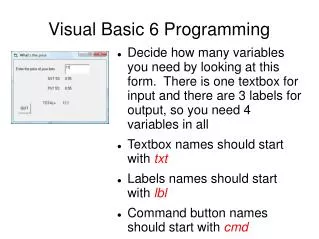
Visual Basic 6 Programming • Decide how many variables you need by looking at this form. There is one textbox for input and there are 3 labels for output, so you need 4 variables in all • Textbox names should start with txt • Labels names should start with lbl • Command button names should start with cmd
Visual Basic 6 Programming • Numeric variables should start with sgl (for single) • Text variables should start with str (for string) Variable & Object Naming Conventions TxtPrice will have a corresponding variable sglPrice LblGST will have a corresponding variable sglGST LblPST will have a corresponding variable sglPST LblTotal will have a corresponding variable sglTotal
Visual Basic 6 Programming Variables section Dim sglPrice as single 'this is to store the price Dim sglGST as single Dim sglPST as single Dim sglTotal as single • Use an apostrophe to make comments: 'This is a comment it will appear green • Variables are locations in the computer memory • Objects on the form (textboxes etc) are what the user interacts with.
Visual Basic 6 Programming INPUT section • This is where the input the user types into a textbox is passed onto the variable • In order to convert text from the textbox into a number, you use the val() function: SglPrice = val(txtPrice.text) strName = txtName.text strName = “Joe” ‘Notice the double quotes around Joe • DO NOT use val if you are assigning a value to a text variable (string variable)! • Notice the variable getting assigned a value is always on the left side of the = sign
Visual Basic 6 Programming Calculation section • should only use variables (just like in math!) • There are 3 calculations in this case sglGST = sglPrice * 0.05 sglPST = sglPrice * 0.05 sglTotal = sglPrice + sglGST + sglPST • Again, notice that the variable being assigned a value MUST be on the left side of the = sign. • DON’T use OBJECTS in this section (txt or lbl)
Visual Basic 6 Programming OUPUT Section • You will now have to output the 3 output variables to the 3 corresponding labels lblGST.caption = sglGST lblPST.caption = sglPST lblTotal.caption = sglTotal
This program responds to the change event. When the user types in something into the textbox, the program executes. TxtPrice LblGST LblTotal LblPST
Visual Basic 6 Programming Reminders • Textboxes have a text property • Labels, Command buttons, and Forms have a caption property