
Uploaded by
lucita
1 SLIDES
890 VUES
120LIKES
Inside Micrometer
DESCRIPTION
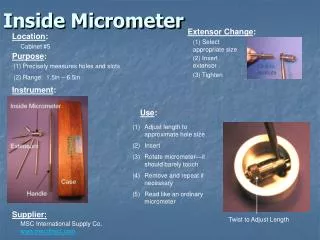
Inside Micrometer. Extensor Change :. Location :. (1) Select appropriate size. Cabinet #5 . Purpose :. (2) Insert extensor. (1) Precisely measures holes and slots (2) Range: 1.5in – 6.5in. Click to Animate. (3) Tighten. Instrument :. Use :.
Download
1 / 1
Télécharger la présentation 
Inside Micrometer
An Image/Link below is provided (as is) to download presentation
Download Policy: Content on the Website is provided to you AS IS for your information and personal use and may not be sold / licensed / shared on other websites without getting consent from its author.
Content is provided to you AS IS for your information and personal use only.
Download presentation by click this link.
While downloading, if for some reason you are not able to download a presentation, the publisher may have deleted the file from their server.
During download, if you can't get a presentation, the file might be deleted by the publisher.
E N D
Presentation Transcript
Inside Micrometer Extensor Change: Location: (1) Select appropriate size Cabinet #5 Purpose: (2) Insert extensor (1) Precisely measures holes and slots (2) Range: 1.5in – 6.5in Click to Animate (3) Tighten Instrument: Use: • Adjust length to approximate hole size • Insert • Rotate micrometer—it should barely touch • Remove and repeat if necessary • Read like an ordinary micrometer Supplier: Twist to Adjust Length MSC International Supply Co. www.mscdirect.com









More Related