Simple Ray Tracing Framework
This comprehensive guide covers the development of a simple ray tracing framework using C# and WinForms for interactive image previews. The framework includes features such as environment lighting, geometry definitions (spheres, polygons), and a customizable camera system described via an XML file. Learn to implement major components like scene resources, textures, and materials while utilizing advanced functionalities like multi-threading support. This resource is designed for those aiming to grasp essential concepts in real-time ray tracing while building a visually appealing GUI for 3D scene representation.

Simple Ray Tracing Framework
E N D
Presentation Transcript
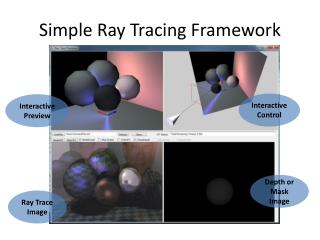
Simple Ray Tracing Framework Interactive Control Interactive Preview Depth or Mask Image Ray Trace Image
Technologies • C# • Just another programming language • WinForm: • GUI Application Development • not covered in this class • Interactive Viewing: • XNA (can be OGL or D3D) • To be covered in second half
The Scene • Describe by XML (text) file! • Four major components • Image Spec (Film in a camera) • The Camera • Environment (Lighting condition) • The Objects • Geometry: spheres and polygons • Material properties
XML Scene Description • Similar to Maya’s .ma file • Extremely simpler version!! • Example Command File Camera: eye Camera: lookat
Source Code Structure • Two Projects: • 3DPreviewer: Shell container • RayTracer: Our source code • Parser (translate XML into data structure) • RTCore: Shading, Image representation: • DoNotChange: RT thrade support (later) • NeedToUse: Shading, Utilities • RTSupport • Geometry • RaySupport: • Ray and IntersectionRecord • SceneResourceSupport • Texture, Light, Materials • 2 libraries: • GUI, Graphics, 2 MVC Support
Representation SceneDatabase ImageSpec Geometry RTCamera IntersectionRecord Ray • Link to StarterProject
RTWindow.cs: App Container • App Window Shell • In WindowsForm
Parser.cs: XML Parser • Translates Command File into data structures • In RayTracer: Parser/CommandFileParser.cs
RTCore: Folder • DoNotChange Folder: • No need to even examine the source • Thread support (to cover later in the quarter) • NeedToUse Folder • Need to understand the code • No need to change • Three files: Compute, ImageFrameSupport, and Init • Essential to understand • Necessary for 3D Viewing and Camera implementation
Geometry and RaySupport • Geometry • geometries in the scene • For now only: Rectangles and Spheres • No need to worry until much later • Ray • Ray: Origin + Direction • Ray constructor: TAKES 2 positions!! • IntersectionRecord
Transformation • The <xform> tag • The implementaiton in • RTGeometry_ParseXForm.cs • Rectangle::Parsing at the end:
Geometry and RaySupport Ray Sphere Rectangle IntersectionRecord
RTCamera: mEye mAt
ImageSpec: Resolution Must Compute Each Pixel Location!!
SceneDataBase • Contains all the scene resources • Geometries, Textures, Materials, Lights • Simple index tables for each resource
Calling Sequence • RTWindow::BeginRT() /* from BeginRT Button • Create and Init: image, mask, depth buffers • RTCore::BeginRTThread • In RTCore/DoNotChange/RTCore_Thread.cs • one/more separate thread(s) call to • RTCore::ComputeImage • In RTCore/RTCore_Compute.cs • Loop through all pixels, for each pixel • Compute visibility, coverage, depth
Important Functions • RTCore::ComputeVisibility() • In RTCore/RTCore_Visibility.cs • Use -1 for exceptGeomIndex for now • RTCore::ComputeShading() • In RTCore/RTCore_Shade.cs • Use 0 for generation for now