Step-by-Step Guide to CITI Program Registration and IRBNet Upload
This guide provides a clear, step-by-step process for registering with the CITI Program through Michigan Tech. Begin by creating an account and providing necessary personal information. Choose the appropriate training module, preferably 'Basic Human Subjects – Social & Behavioral Focus'. After completing your training, log in to access your completion report and save it as a PDF. Finally, upload the report to your IRBNet user profile to fulfill your research compliance requirements.

Step-by-Step Guide to CITI Program Registration and IRBNet Upload
E N D
Presentation Transcript
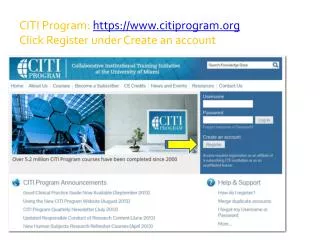
CITI Program: https://www.citiprogram.org Click Register under Create an account
Most will select Basic Human Subjects – Social & Behavioral Focus from the drop down menu, continue
Choose: Faculty or staff must choose one of the top three modules, students may choose the module labeled Students conducting no more that minimal risk research at the bottom Continue with Q’s 2,3, and 4
Answer Q’s 5 and 6, then click the Complete Registration button at the bottom of the page.
If you registered for awrong course, or need to complete refresher courses, you can change your “learner group” here:
CITI training is completed, what’s the next step?Log in to citiprogram.orgLocate your most recent completion report and save as a pdf on your hard drive. Upload the pdf to your IRBNet user profile