Download
1 / 2
Optimize Display with WatchMate Filtering
20 likes | 93 Vues
Enhance navigation by effectively filtering irrelevant ships on the display using WatchMate Filters. Prioritize high-risk collision targets for better safety and visibility.

Télécharger la présentation 
Optimize Display with WatchMate Filtering
An Image/Link below is provided (as is) to download presentation
Download Policy: Content on the Website is provided to you AS IS for your information and personal use and may not be sold / licensed / shared on other websites without getting consent from its author.
Content is provided to you AS IS for your information and personal use only.
Download presentation by click this link.
While downloading, if for some reason you are not able to download a presentation, the publisher may have deleted the file from their server.
During download, if you can't get a presentation, the file might be deleted by the publisher.
E N D
Presentation Transcript
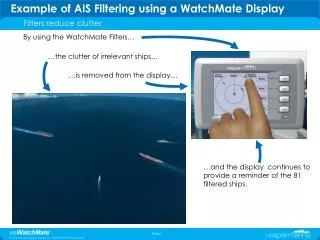
Example of AIS Filtering using a WatchMate Display Filters reduce clutter By using the WatchMate Filters… …the clutter of irrelevant ships… …is removed from the display… …and the display continues to provide a reminder of the 81 filtered ships.
Example of AIS Filtering using a WatchMate Display Focus on the Most Important Targets - Identify Priority Traffics The ship that creates the highest risk of collision is prioritized… …and shown on the display in list order of priority










More Related